CASE STUDY
ATLYSS - UX/UI REDESIGN


TYPE OF PROJECT:
Rapid UI Redesign and UX Suggestions for "Hytale".
PROJECT LENGTH:
1 WEEK
ROLE:
UI ARTIST &
UX DESIGNER
TOOLS UTILIZED:


HYTALE: RAPID UI REDESIGN & UX SUGGESTIONS
A 1-week exploration of the early-access interface for Hytale. This project focuses on solving specific visibility issues in the HUD and streamlining inventory management through layout optimization.
DISCLAIMER: This case study was written during Hytale's Early Access version v2026.01.17-4b0f30090, meaning that at the time of reading, many of the features introduced in this redesign project may have already been introduced.
THE HUD: SOLVING FOR ACCESSIBILITY
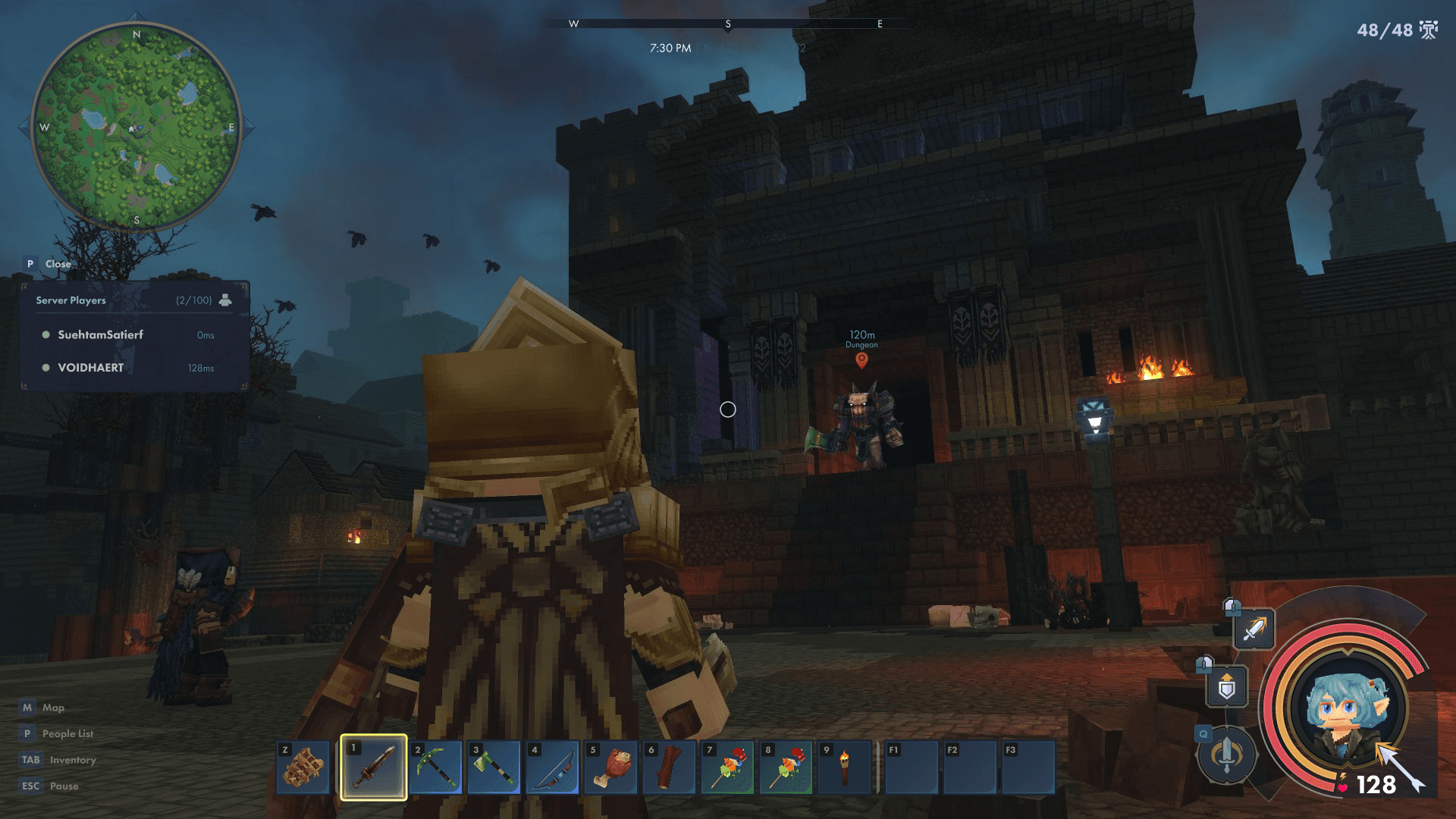
The original Hytale HUD is elegant but lacks certain high-frequency information. My redesign introduces several Quality-of-Life (QoL) features aimed at improving navigation and combat flow:
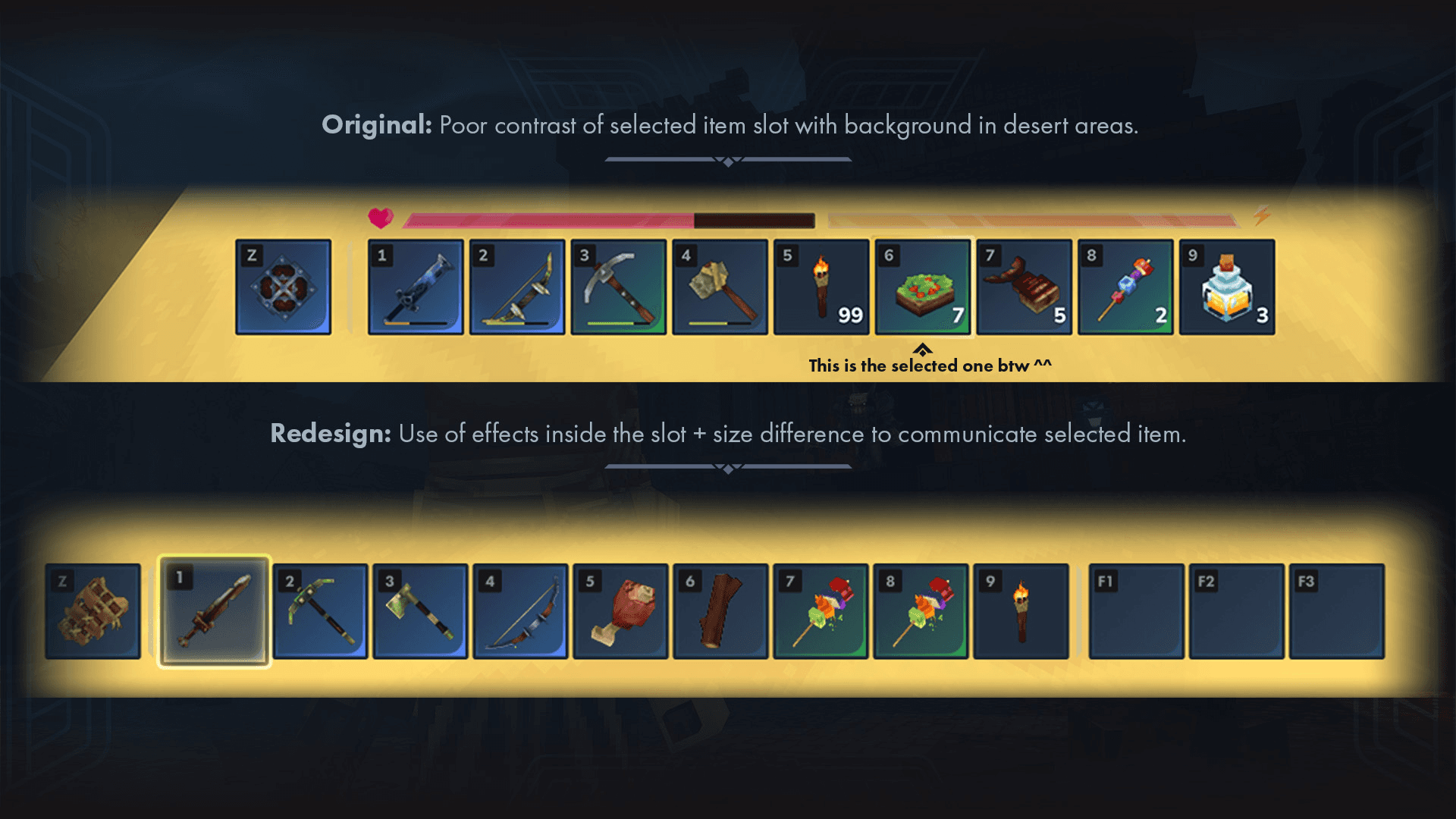
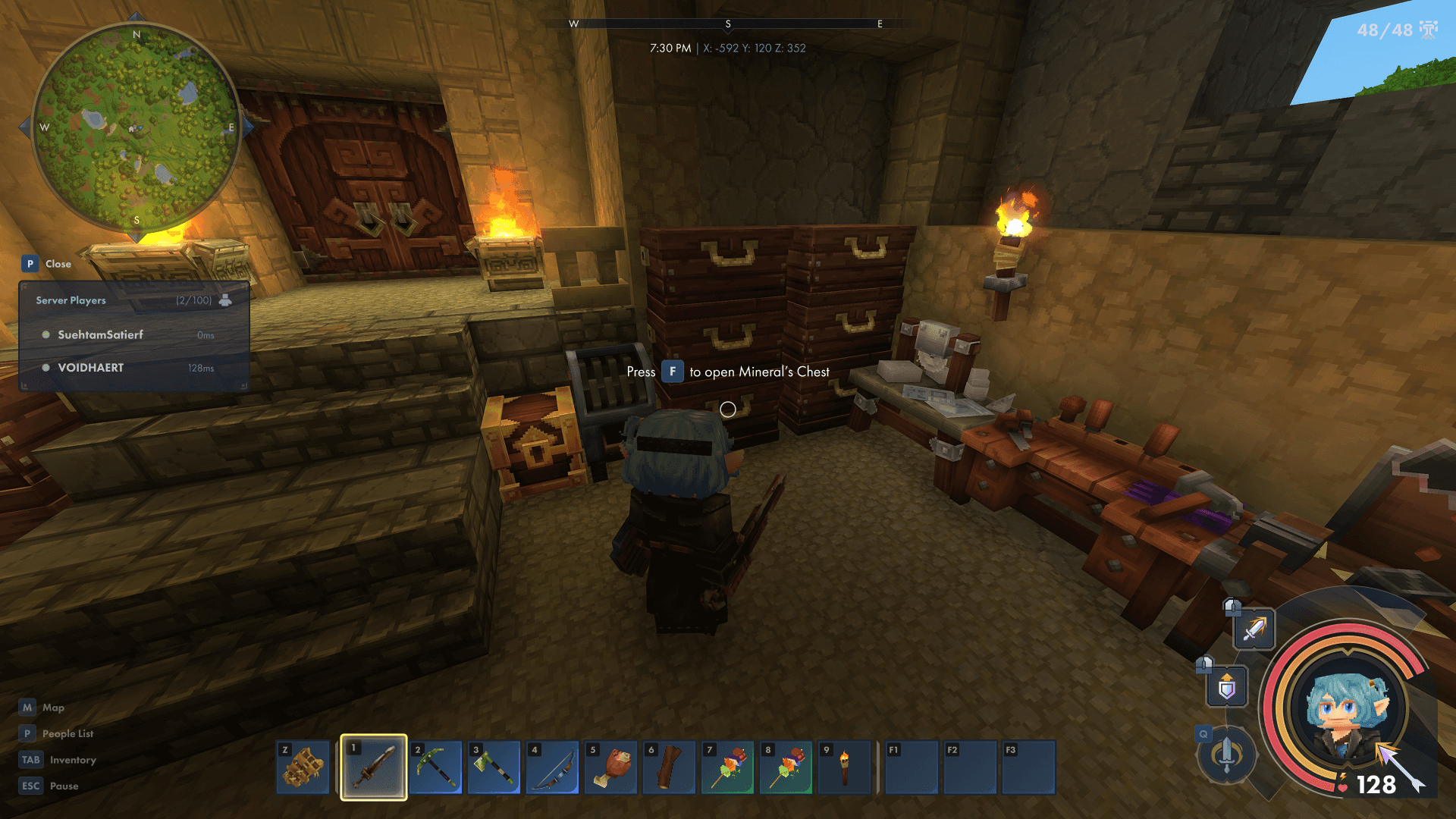
Hotbar Accessibility: I addressed contrast issues in bright biomes by adding internal slot glow effects and scaling up the active slot for clear size differentiation.
Navigation & Wayfinding: I integrated a dedicated Minimap and a Time/Coordinate display to facilitate world navigation without needing to open full-screen menus.
Combat Fluidity: I added Quick Slots (F1–F3) for instant potion consumption, reducing combat friction by removing the need to navigate the full hotbar during high-intensity encounters.
Social & Co-op Utility: A new People List with ping indicators and a 3D Ping System were added to streamline communication during multiplayer sessions.
Memories Awareness: To prevent player forgetfulness on how many memories they currently have, I added a persistent Memories Counter so players can track their memories capacity at a glance.
Stylized Radial HUD: I proposed a more character-centric radial health/mana display to add personality and include a dedicated ammo counter.
INVENTORY & ITEM MANAGEMENT
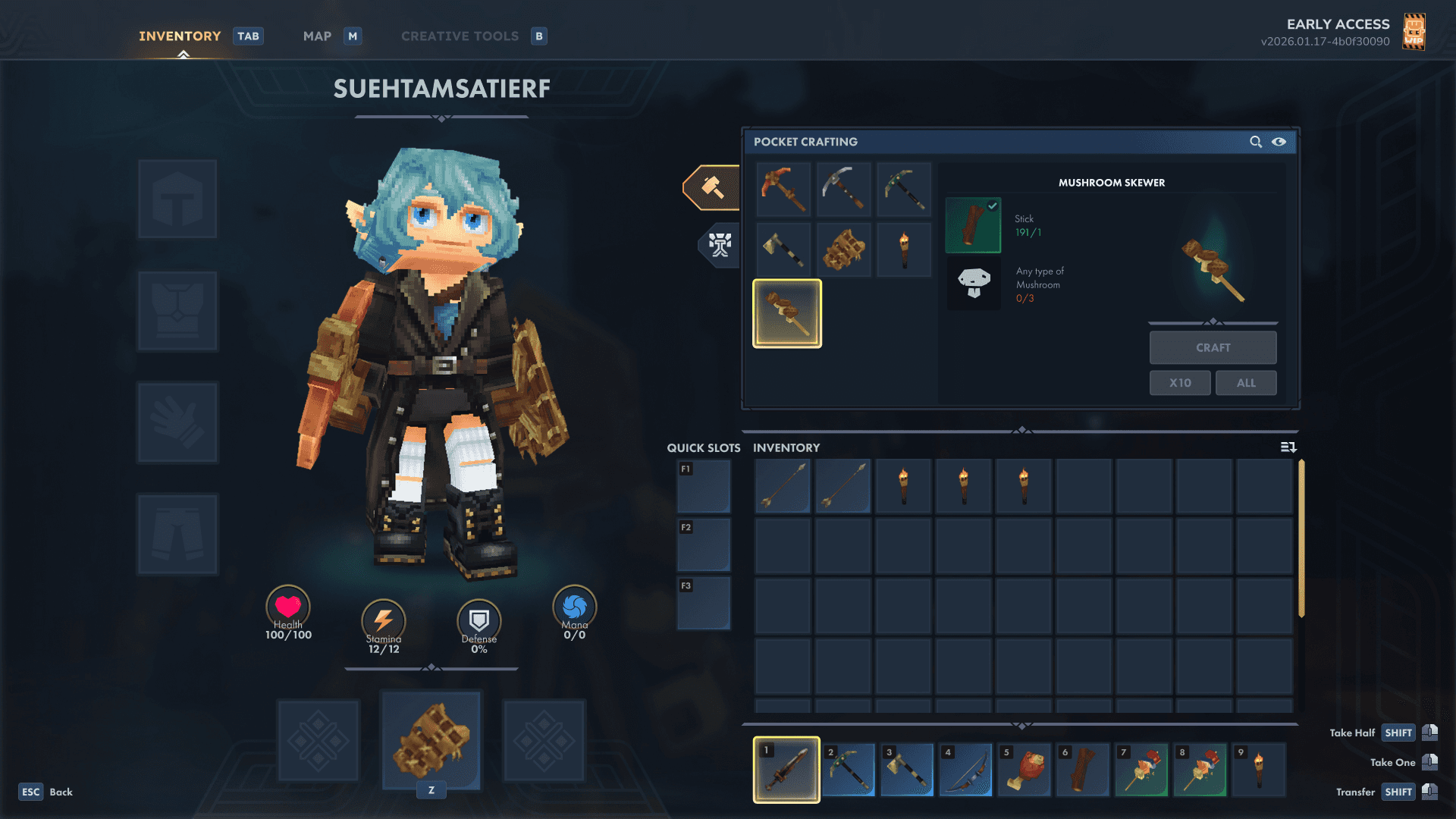
The redesign pivots from a restrictive 3-column window system to a 2-column layout, prioritizing screen real estate for the player's primary interactions.
Unified Backpack System: Replaced the secondary "backpack inventory" with a dynamic expansion of the main grid. Upgrading your backpack now unlocks additional slots directly in the main view, reducing menu fatigue.
Chest Renaming & UX: Added a "Rename" feature for storage containers. To streamline sorting, the custom chest name appears directly in the world space as a floating UI prompt, allowing players to identify contents without opening the container.
Vertical Scalability: Included a subtle scroll bar and partially visible lower rows to signal inventory depth as the player progresses.
AVATAR CUSTOMIZATION & WARDROBE
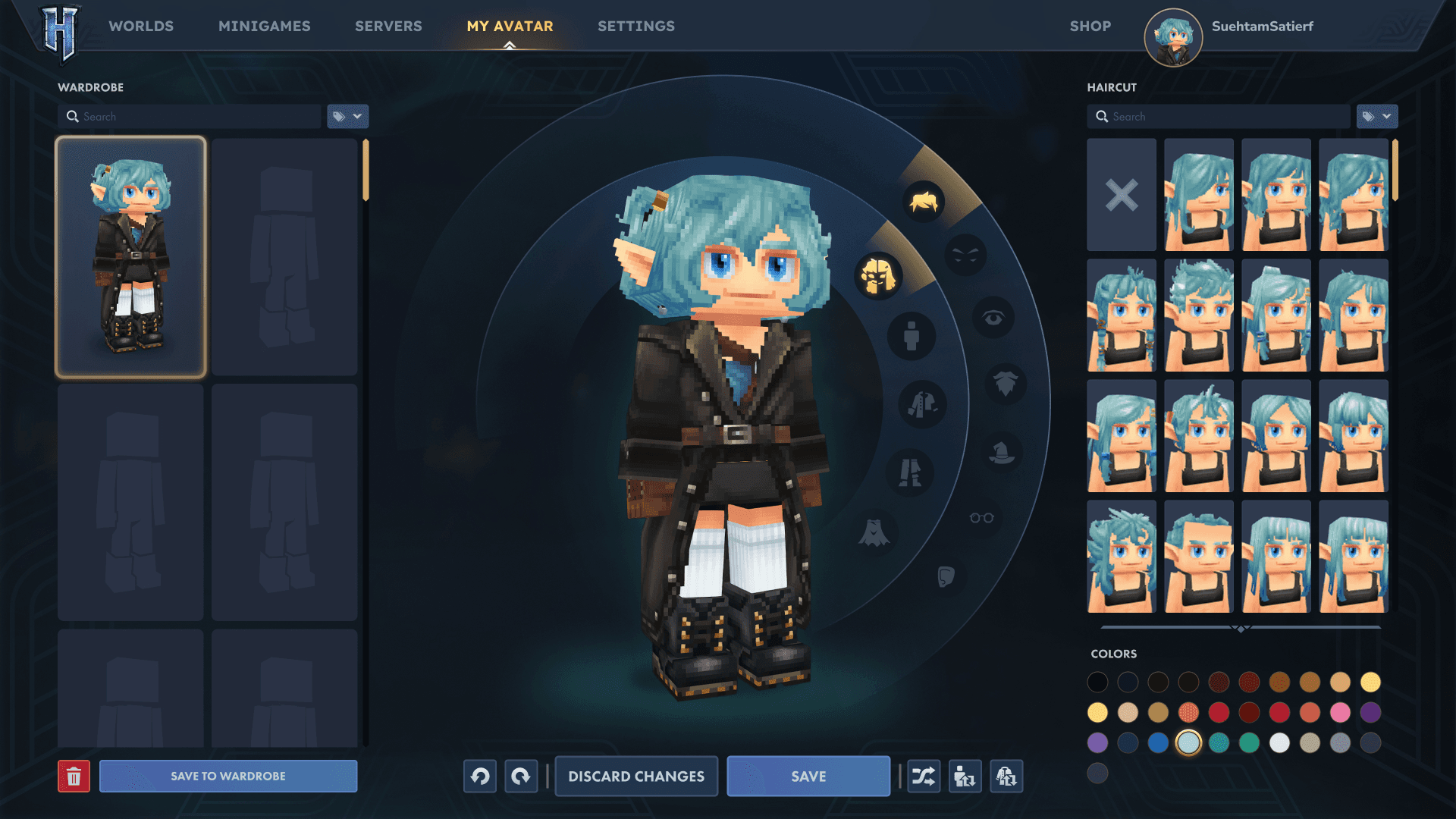
This screen was overhauled to put 100% of the focus on the player's unique character, utilizing a 3-column architecture with the avatar as the centerpiece.
Radial Category Menu: Introduced a sleek radial selector around the character to switch between customization categories like hair, eyes, and clothing. This creates a natural framing device that keeps the eye centered on the model.
The Wardrobe System: Added a dedicated "Wardrobe" column on the left. This allows players to save and name full outfit presets, encouraging experimentation with Hytale's low-poly aesthetics= without losing their "main" look.
Character Scaling: Increased the character model scale and centralized the position to ensure that fine details and equipment textures are the primary focus of the screen.
WORLD MAP: ENHANCING EXPLORATION
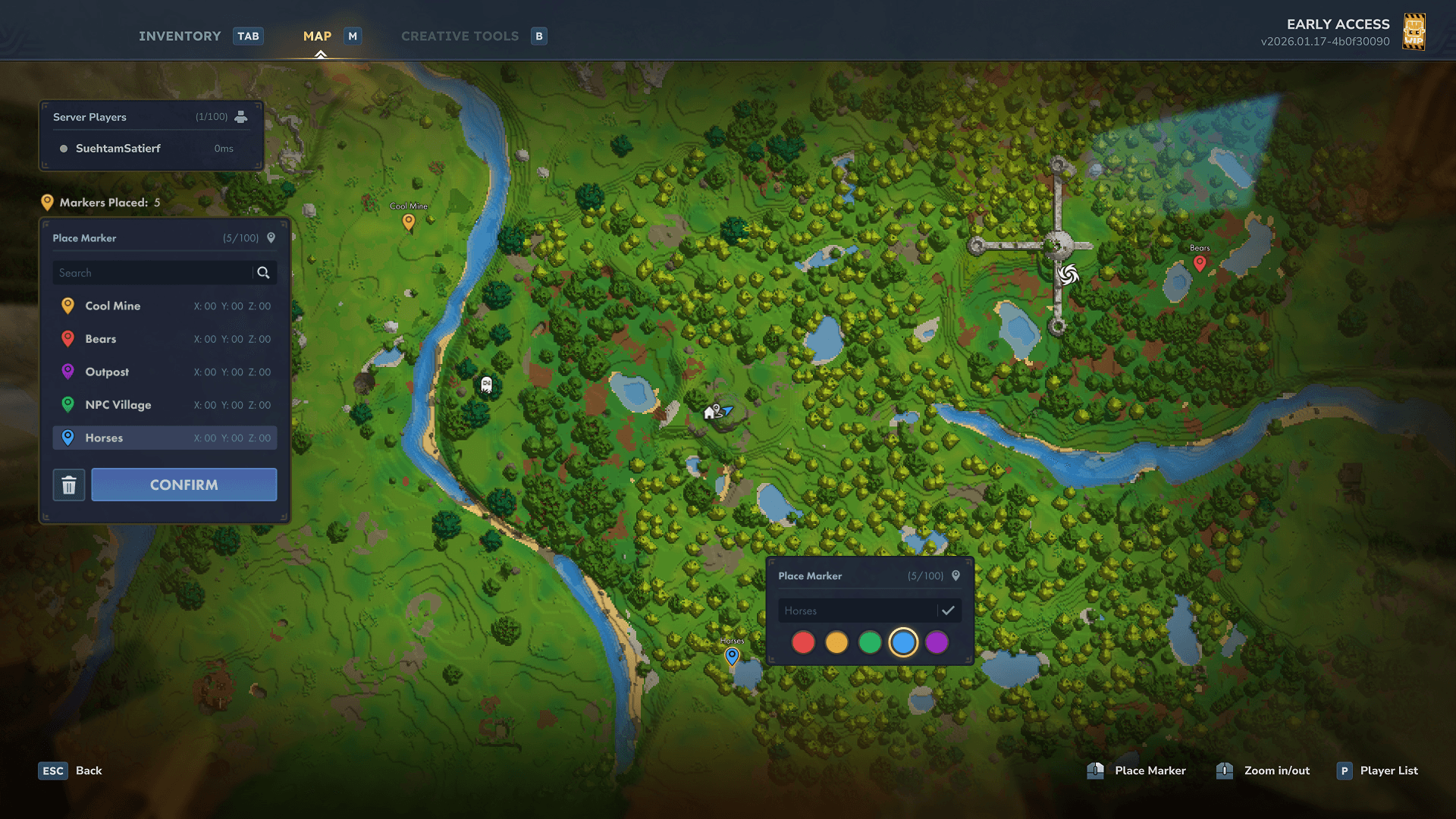
A quick "Quality of Life" (QoL) fix.
Multi-Marker System: Replaced the single-marker limit with a color-coded, labeled marker list. This supports the game’s "Memories" system by allowing players to track multiple points of interest during long-distance exploration.
FINAL TAKEAWAY
This quick project demonstrated how small, targeted UI changes—like slot scaling and layout consolidation—can solve significant player pain points without requiring a full overhaul of the game's existing aesthetic. At the same time, it showed how a rearrangement of the elements on screen can increase visual impact and bring life and flavor to the game's interface.
TYPE OF PROJECT:
Rapid UI Redesign and UX Suggestions for "Hytale".
PROJECT LENGTH:
1
WEEK
ROLE:
UI ARTIST &
UX DESIGNER
TOOLS UTILIZED:
PHOTOSHOP
FIGMA
HYTALE: RAPID UI REDESIGN & UX SUGGESTIONS
A 1-week exploration of the early-access interface for Hytale. This project focuses on solving specific visibility issues in the HUD and streamlining inventory management through layout optimization.
DISCLAIMER: This case study was written during Hytale's Early Access version v2026.01.17-4b0f30090, meaning that at the time of reading, many of the features introduced in this redesign project may have already been introduced.
THE HUD: SOLVING FOR ACCESSIBILITY
The original Hytale HUD is elegant but lacks certain high-frequency information. My redesign introduces several Quality-of-Life (QoL) features aimed at improving navigation and combat flow:
Hotbar Accessibility: I addressed contrast issues in bright biomes by adding internal slot glow effects and scaling up the active slot for clear size differentiation.
Navigation & Wayfinding: I integrated a dedicated Minimap and a Time/Coordinate display to facilitate world navigation without needing to open full-screen menus.
Combat Fluidity: I added Quick Slots (F1–F3) for instant potion consumption, reducing combat friction by removing the need to navigate the full hotbar during high-intensity encounters.
Social & Co-op Utility: A new People List with ping indicators and a 3D Ping System were added to streamline communication during multiplayer sessions.
Memories Awareness: To prevent player forgetfulness on how many memories they currently have, I added a persistent Memories Counter so players can track their memories capacity at a glance.
Stylized Radial HUD: I proposed a more character-centric radial health/mana display to add personality and include a dedicated ammo counter.
INVENTORY & ITEM MANAGEMENT
The redesign pivots from a restrictive 3-column window system to a 2-column layout, prioritizing screen real estate for the player's primary interactions.
Unified Backpack System: Replaced the secondary "backpack inventory" with a dynamic expansion of the main grid. Upgrading your backpack now unlocks additional slots directly in the main view, reducing menu fatigue.
Chest Renaming & UX: Added a "Rename" feature for storage containers. To streamline sorting, the custom chest name appears directly in the world space as a floating UI prompt, allowing players to identify contents without opening the container.
Vertical Scalability: Included a subtle scroll bar and partially visible lower rows to signal inventory depth as the player progresses.
AVATAR CUSTOMIZATION & WARDROBE
This screen was overhauled to put 100% of the focus on the player's unique character, utilizing a 3-column architecture with the avatar as the centerpiece.
Radial Category Menu: Introduced a sleek radial selector around the character to switch between customization categories like hair, eyes, and clothing. This creates a natural framing device that keeps the eye centered on the model.
The Wardrobe System: Added a dedicated "Wardrobe" column on the left. This allows players to save and name full outfit presets, encouraging experimentation with Hytale's low-poly aesthetics= without losing their "main" look.
Character Scaling: Increased the character model scale and centralized the position to ensure that fine details and equipment textures are the primary focus of the screen.
WORLD MAP: ENHANCING EXPLORATION
A quick "Quality of Life" (QoL) fix.
Multi-Marker System: Replaced the single-marker limit with a color-coded, labeled marker list. This supports the game’s "Memories" system by allowing players to track multiple points of interest during long-distance exploration.
FINAL TAKEAWAY
This quick project demonstrated how small, targeted UI changes—like slot scaling and layout consolidation—can solve significant player pain points without requiring a full overhaul of the game's existing aesthetic. At the same time, it showed how a rearrangement of the elements on screen can increase visual impact and bring life and flavor to the game's interface.