


TYPE OF PROJECT:
UX/UI Redesign of the game "ATLYSS"
PROJECT LENGTH:
2
MONTHS
ROLE:
UI ARTIST &
UX DESIGNER
TOOLS UTILIZED:

PHOTOSHOP

ILLUSTRATOR

FIGMA
INTRODUCTION
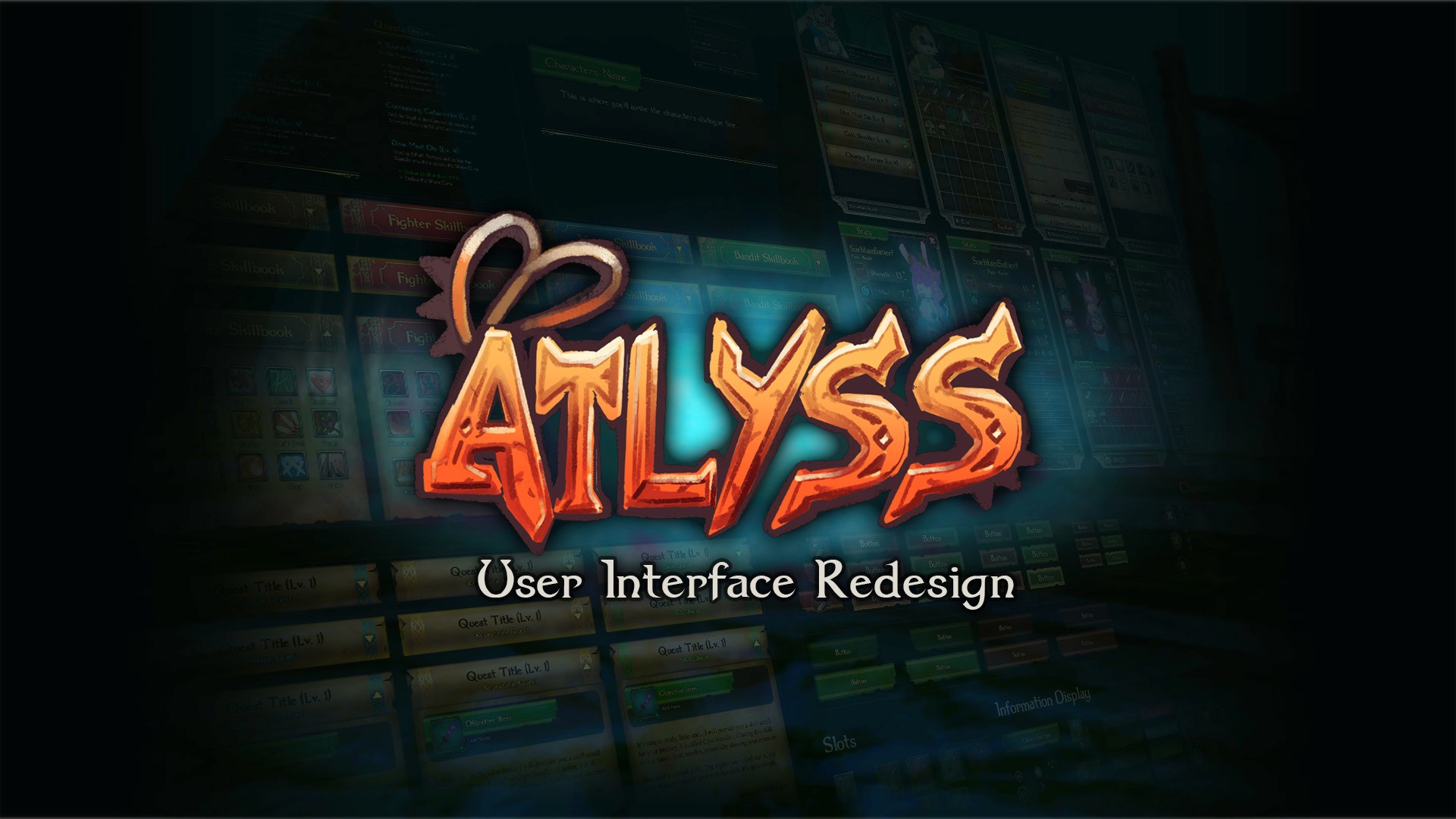
A 2-month solo project focused on modernizing the HUD and Menu systems of the indie ARPG Atlyss. The goal was to replace an unintuitive, inconsistent interface with a hand-painted, Celtic-inspired UI that improves combat readability and visual cohesion.
THE PROBLEM
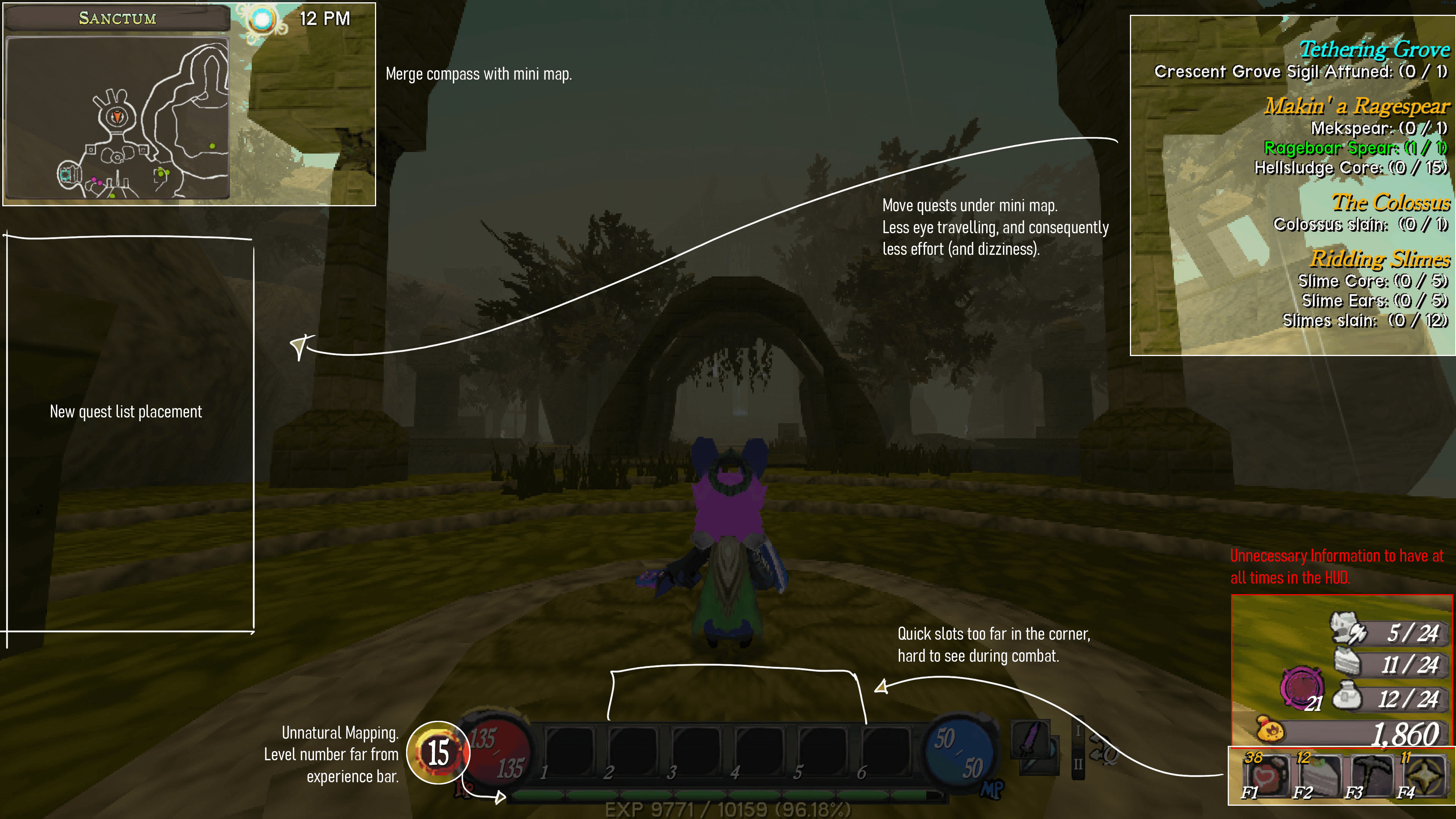
Visual Inconsistency: Clashing typefaces and buttons that lacked affordance.
Poor Ergonomics: Critical combat information (Quick Slots) was pushed to the screen edges, far from the player’s focal point.
UI Clutter: Unnecessary persistent info (inventory counts) obstructed the third-person view.
VISUAL DIRECTION
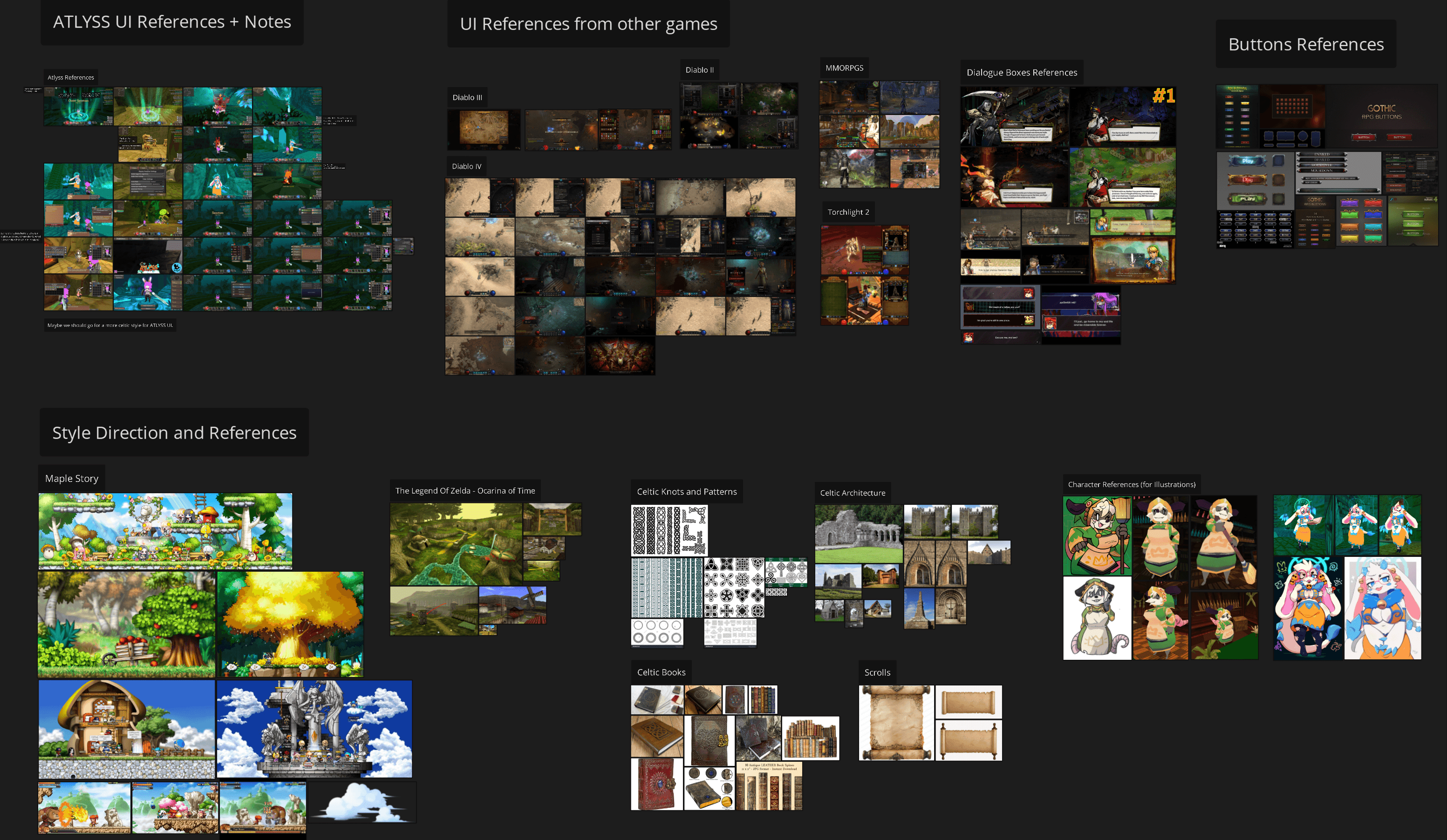
I established a Hand-Painted / Celtic Aesthetic to match the game’s high-fantasy theme.
The HUD: Redesigned the central bar to integrate Quick Slots and Health/Mana into a single, cohesive unit.
Natural Mapping: Relocated the Level indicator next to the XP bar to create a logical connection between progression and status.
LOW-FIDELITY WIREFRAME
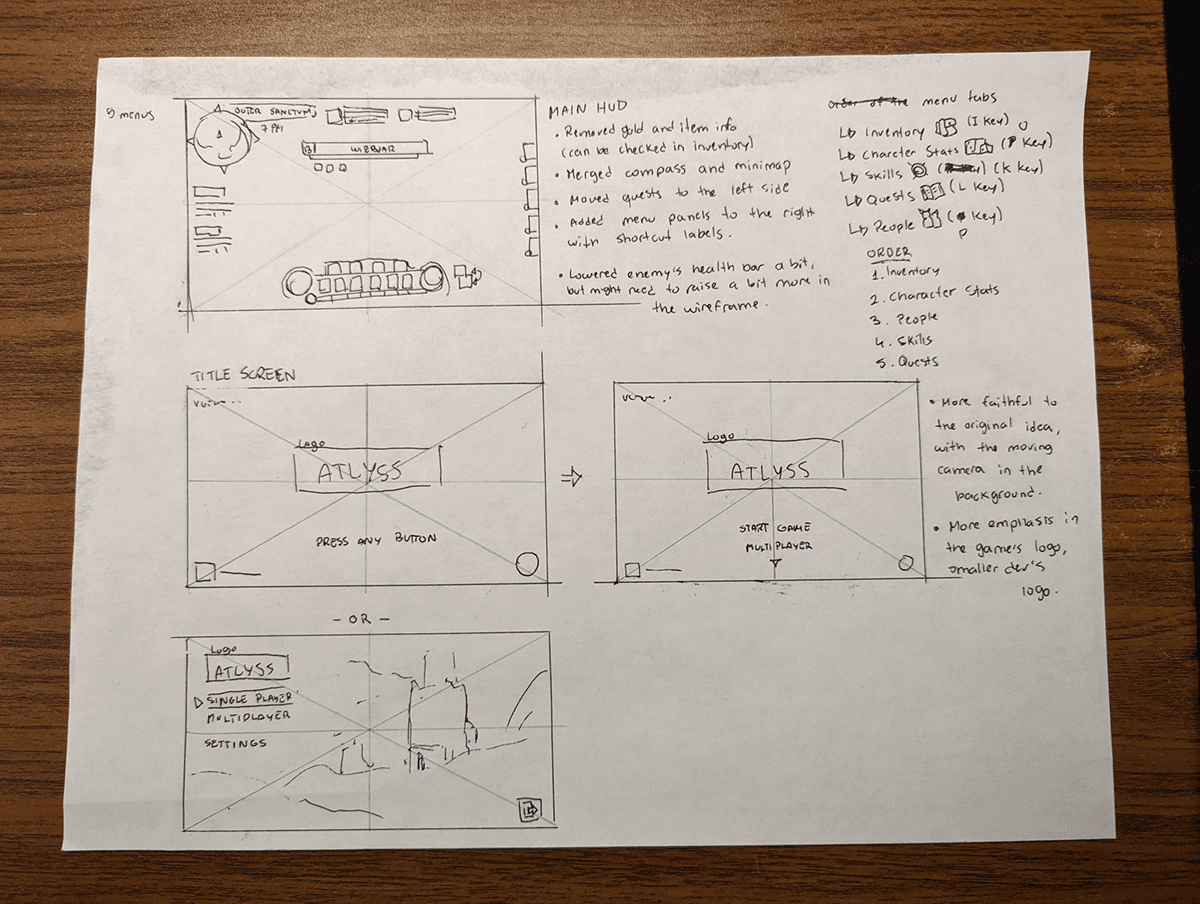
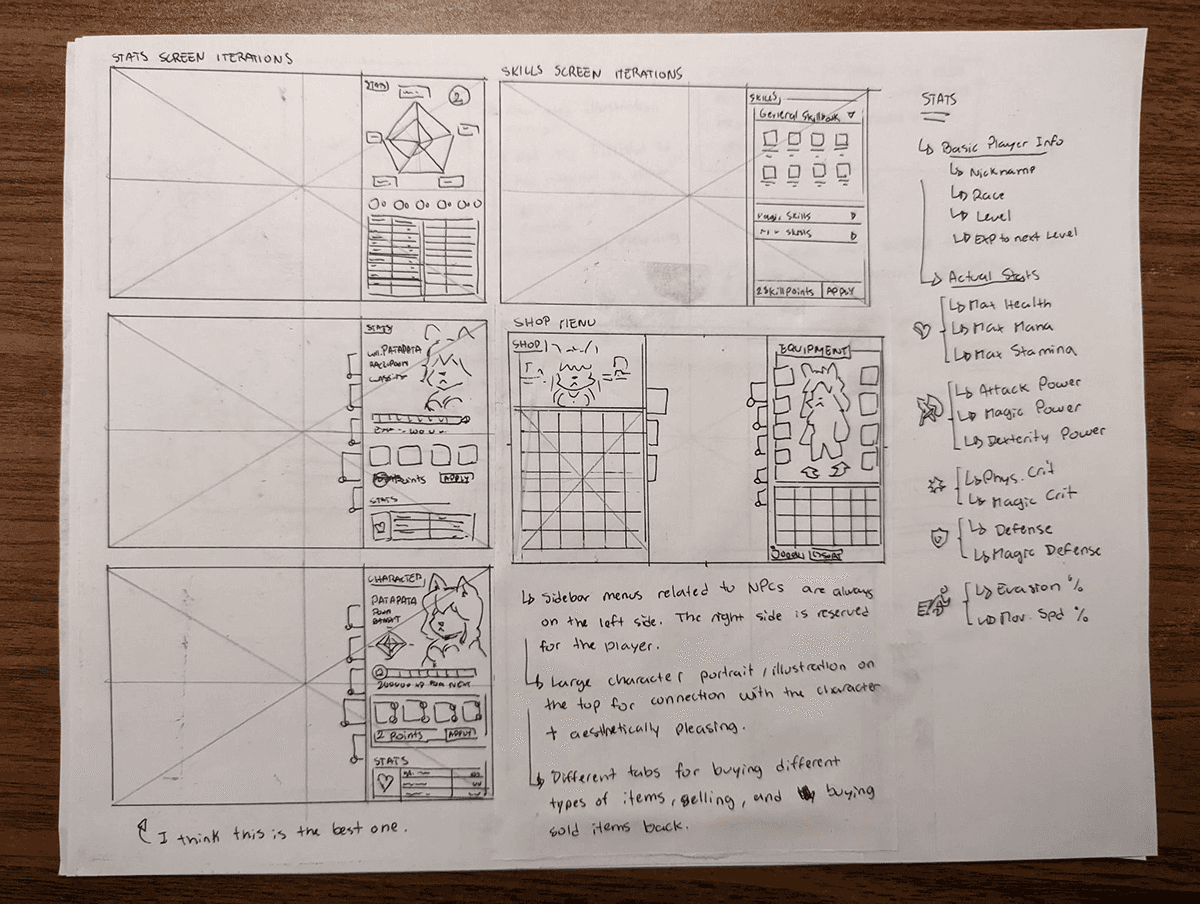
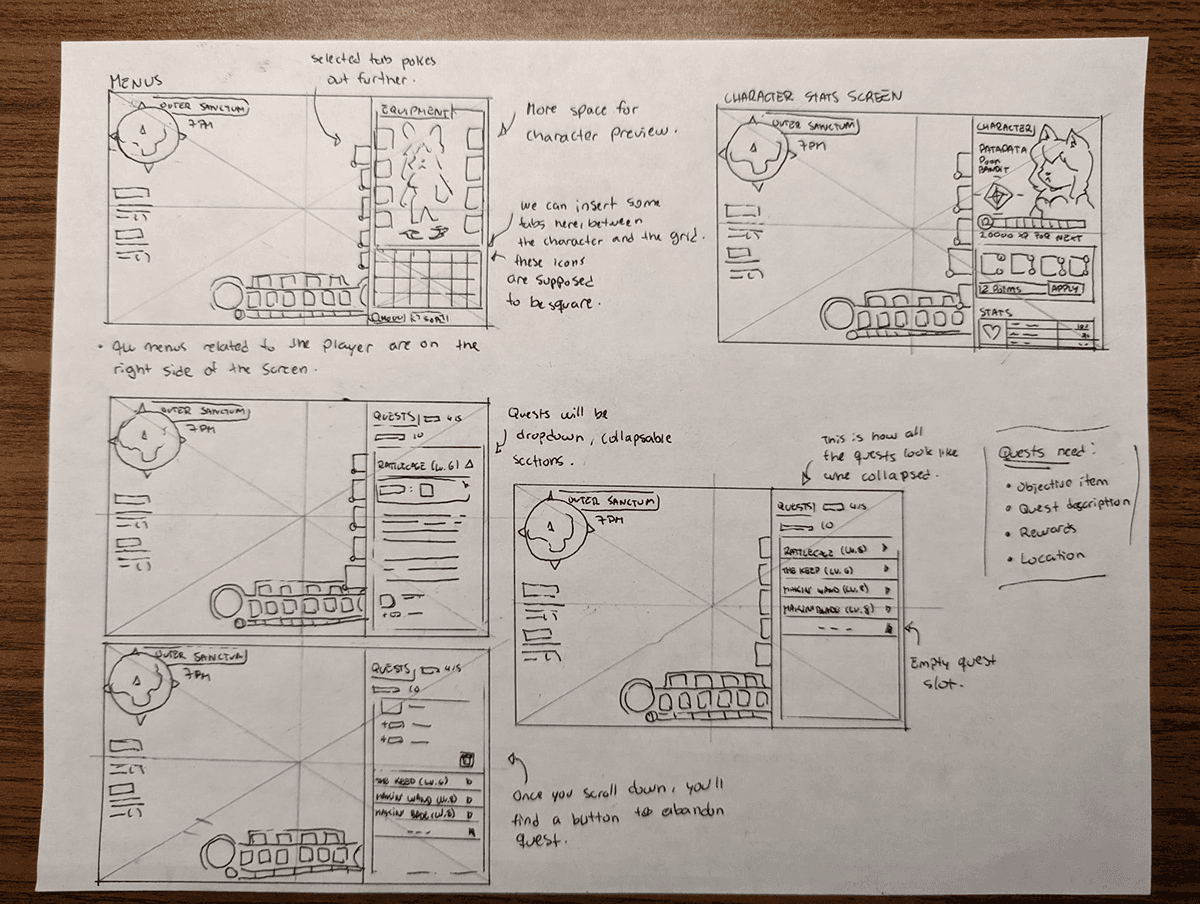
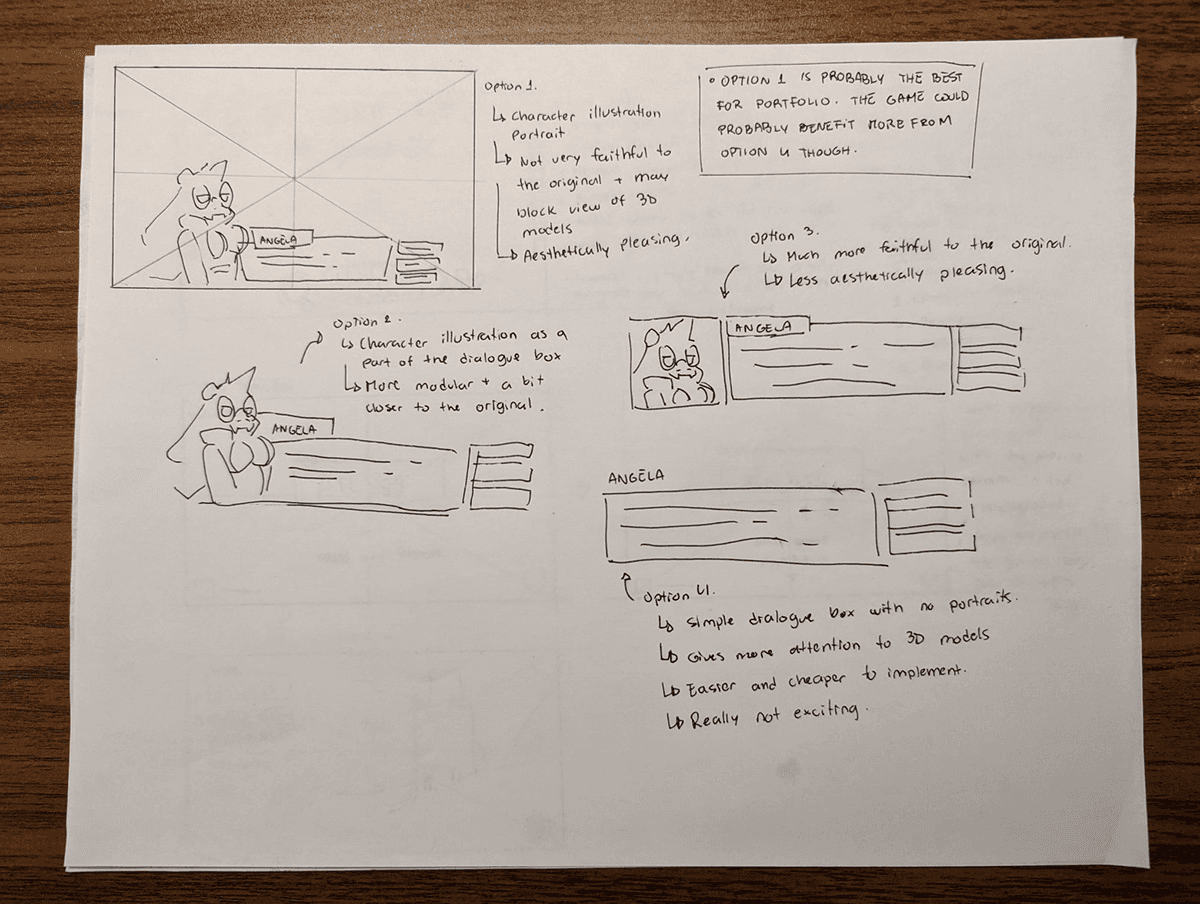
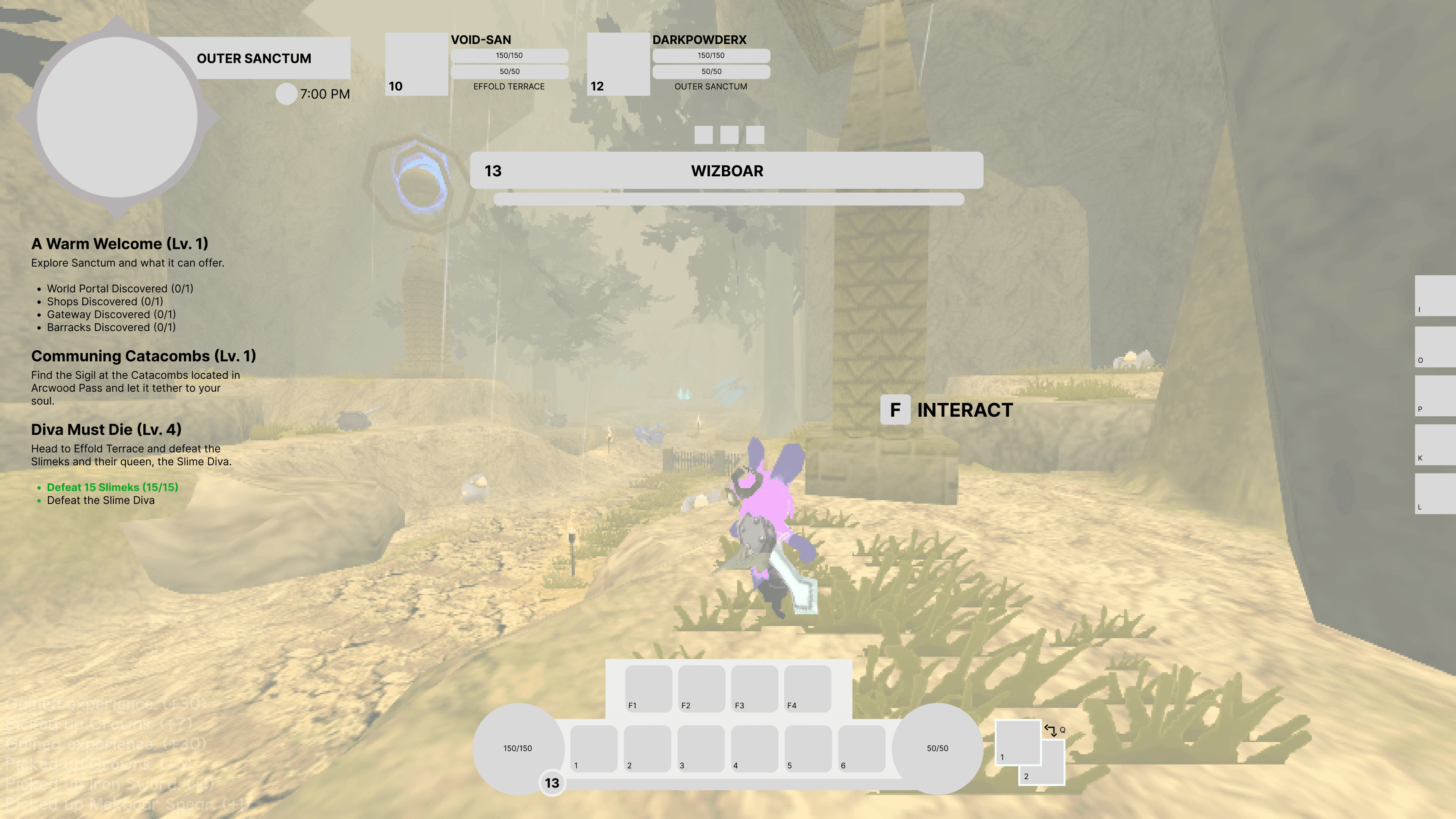
With the information architecture figured out, I was ready to move on to some sketching. I started by wireframing on paper, exploring different layout ideas for the game's HUD and in-game menus. I then moved on to Figma to create a low-fidelity wireframe based on the sketches I had done. Since a good chunk of the exploration had been done on paper, it was mostly a matter of translating it into a digital format.
CONCEPT ART
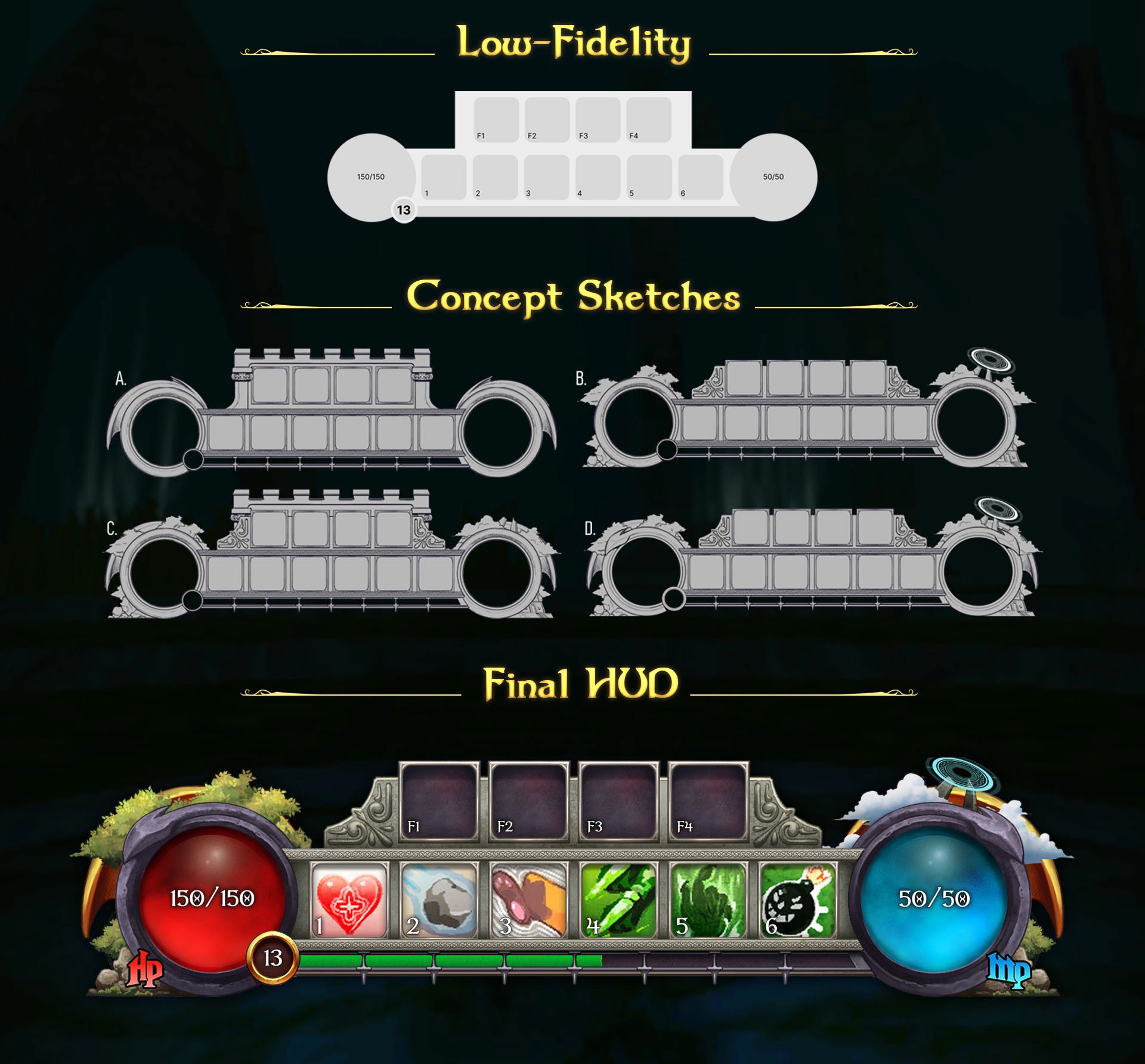
I redesigned the central HUD to improve combat readability by centralizing critical information. Key modifications include:
Ergonomic Integration: I moved the quick-slots from the screen periphery to the central bar, allowing players to track consumables without losing focus on the action.
Natural Mapping: The player level was relocated directly adjacent to the experience bar, creating a logical visual connection for character progression.
Material Rendering: Using the concept sketches as a structural guide, I rendered the final assets with a focus on tactile skeuomorphism to enhance immersion.
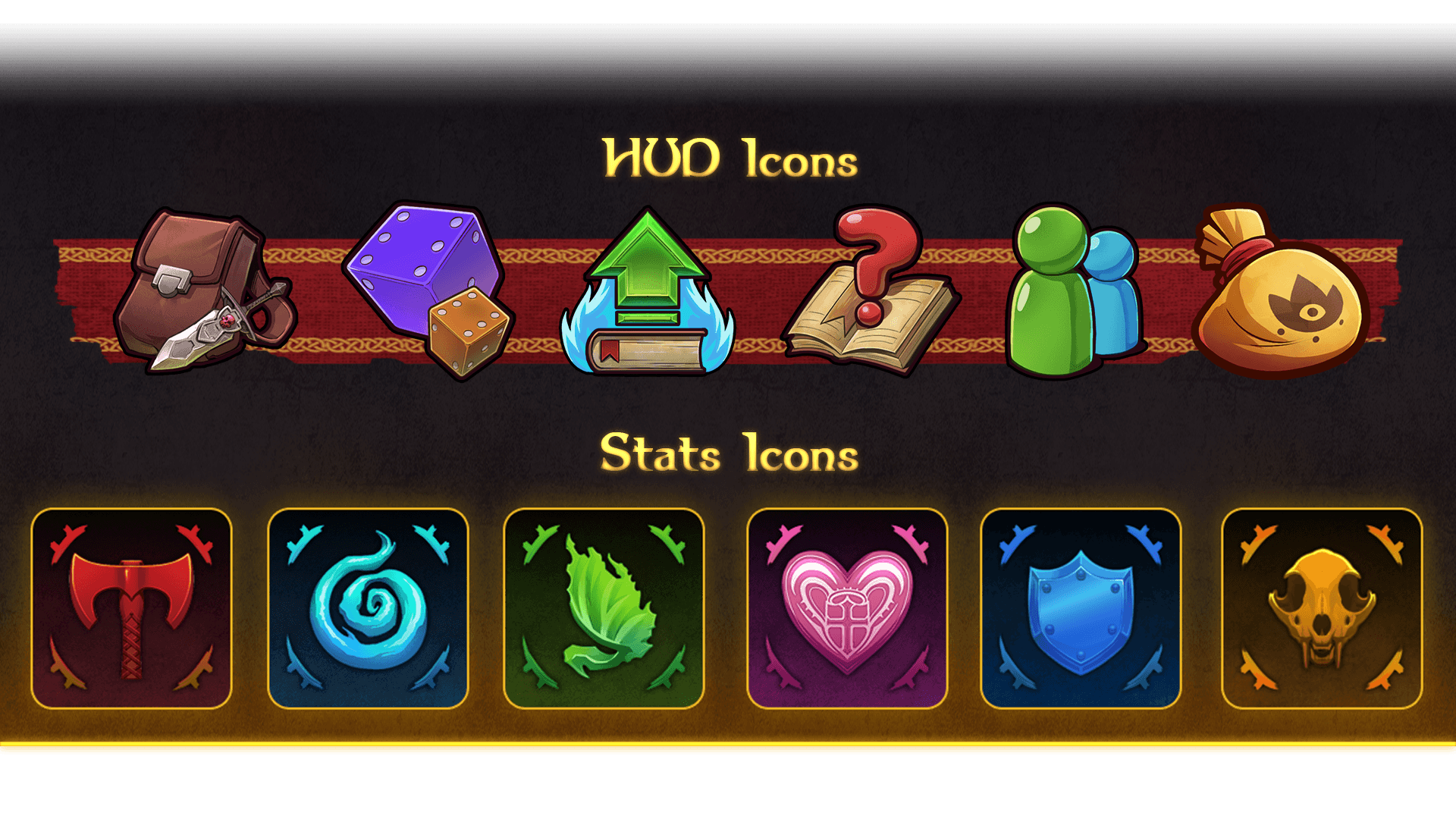
Many of the icons used in this project were taken directly from the game's wiki page, but some new ones had to be created, and others were redone from scratch due to low resolution.
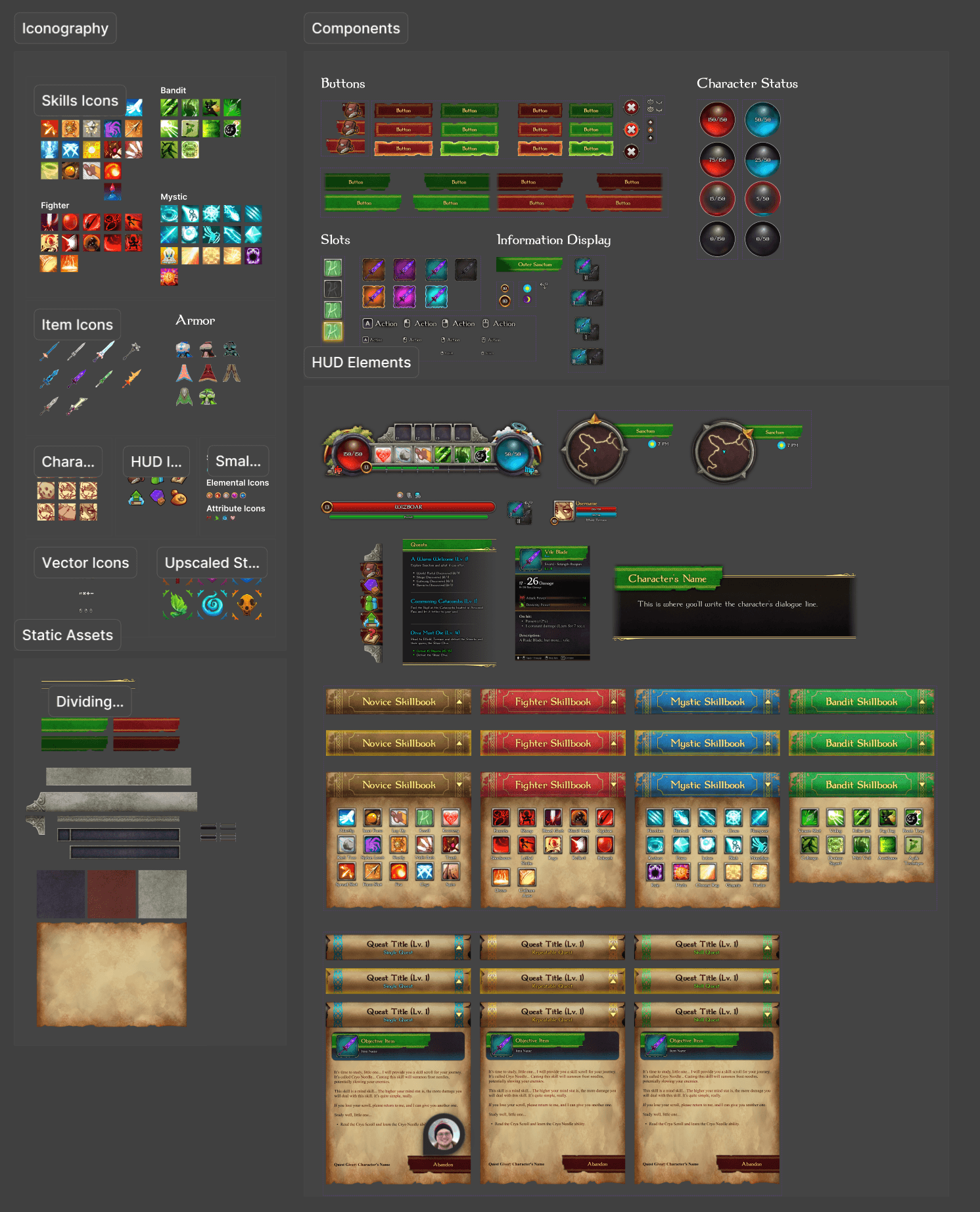
HIGH-FIDELITY WIREFRAME - FIRST VERSION
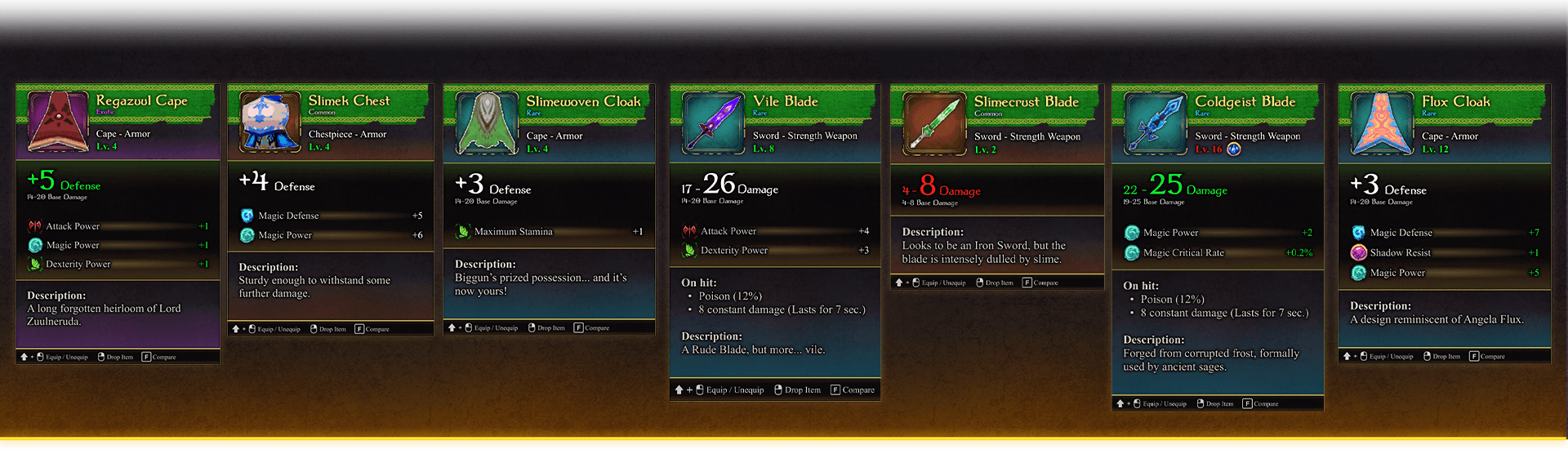
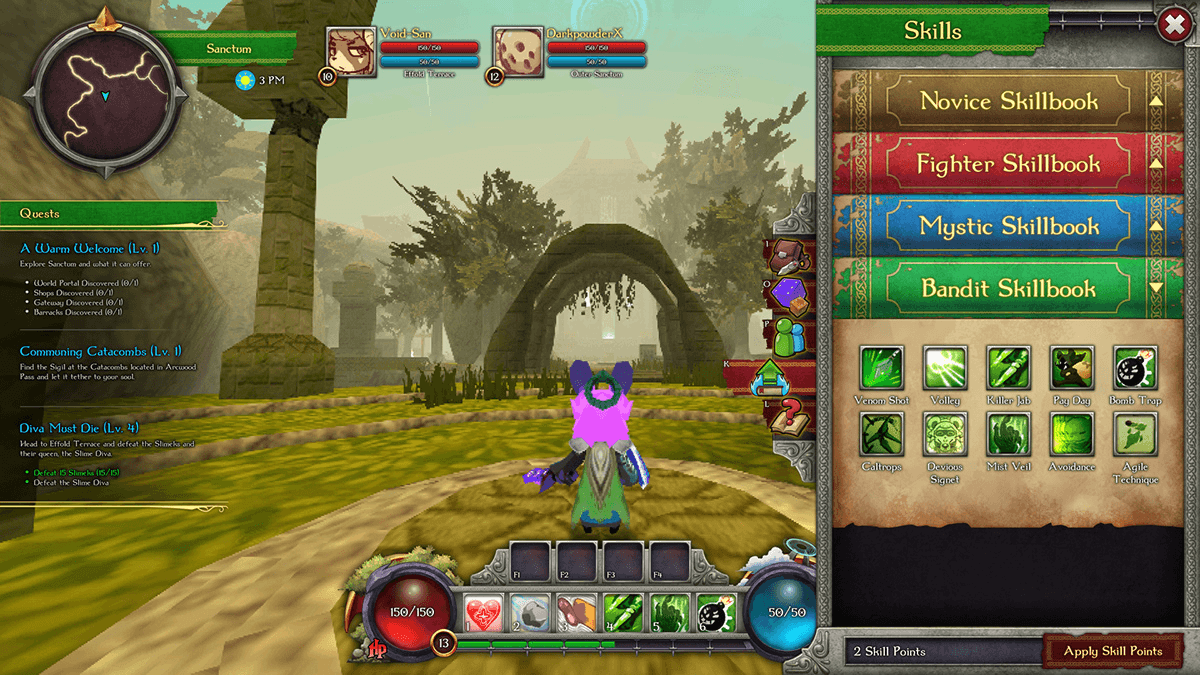
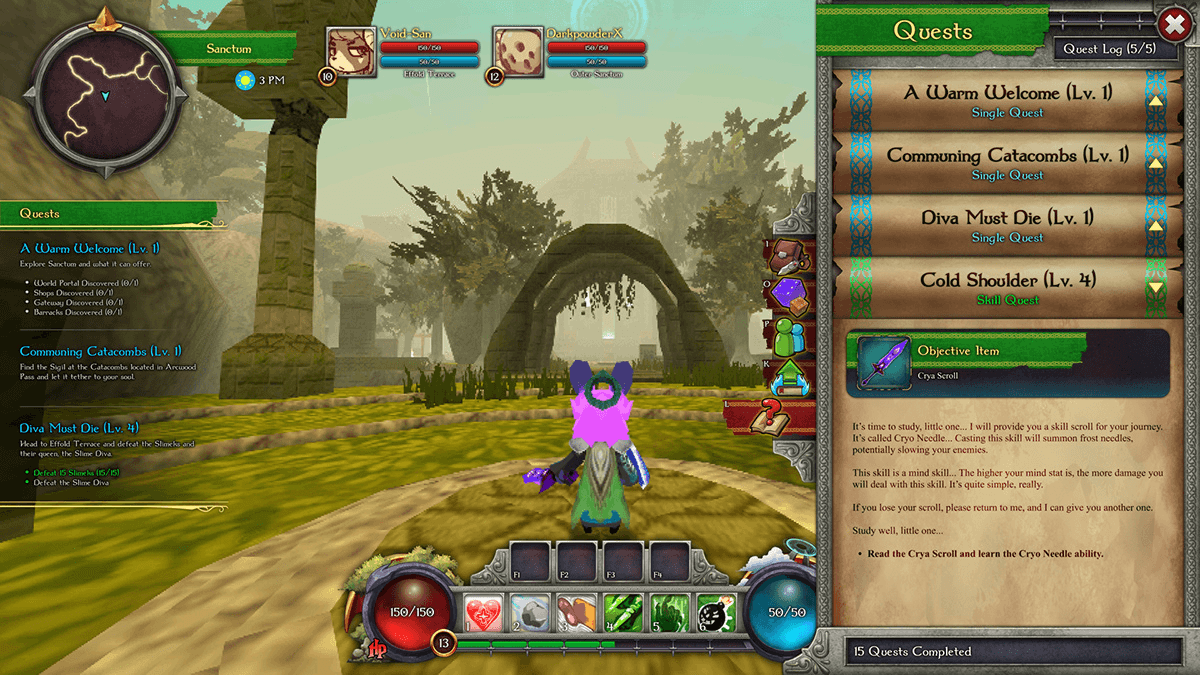
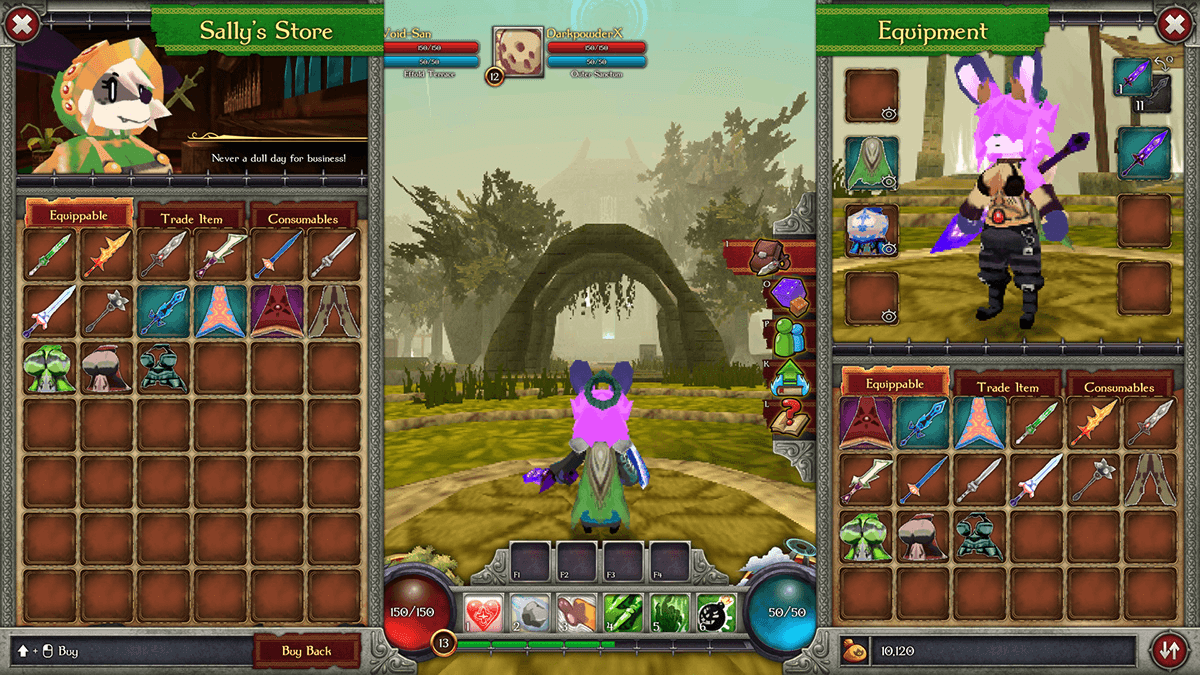
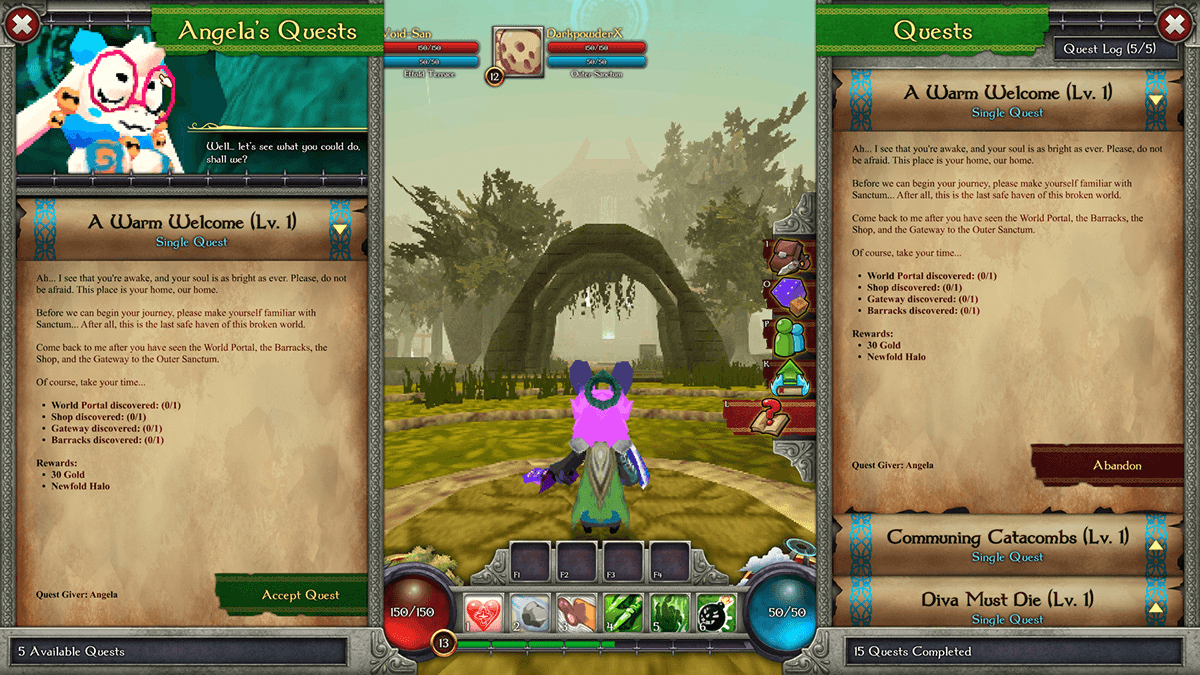
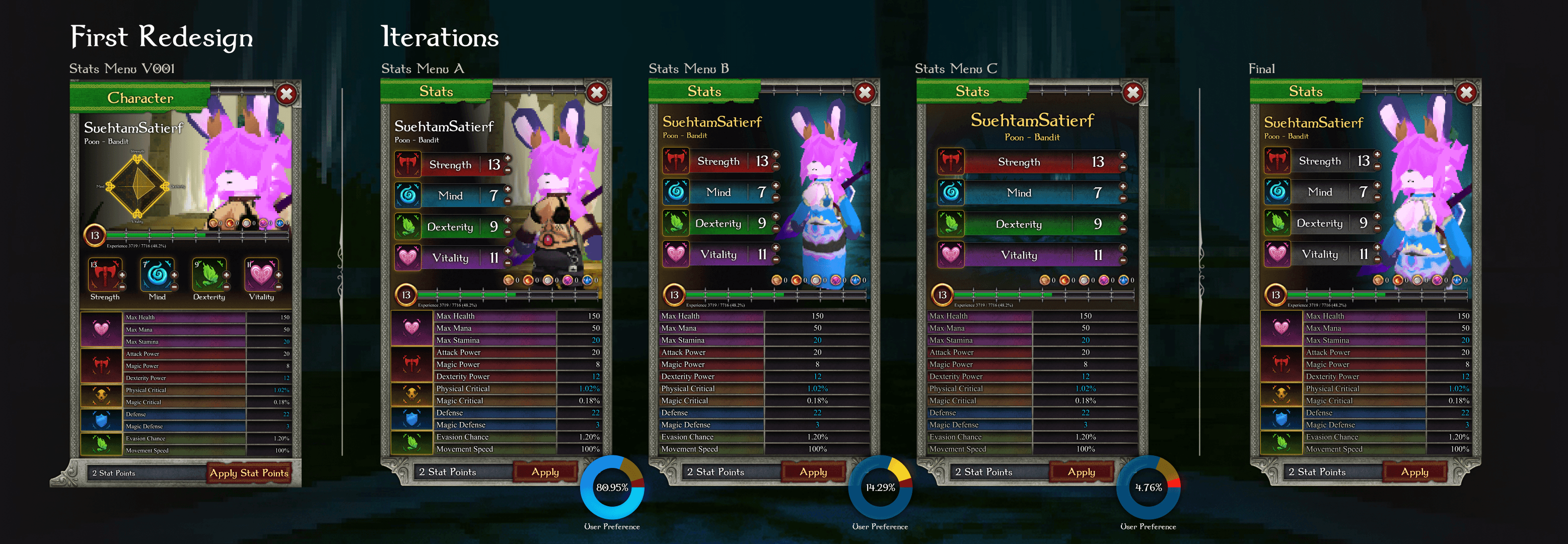
At this point, I had all I needed to create a first pass of the high-fidelity wireframe. At this point in the process, most skeuomorphic assets were already done, meaning that building and experimenting with designs in Figma was faster than in Photoshop. This first version was essential to collect feedback from users.
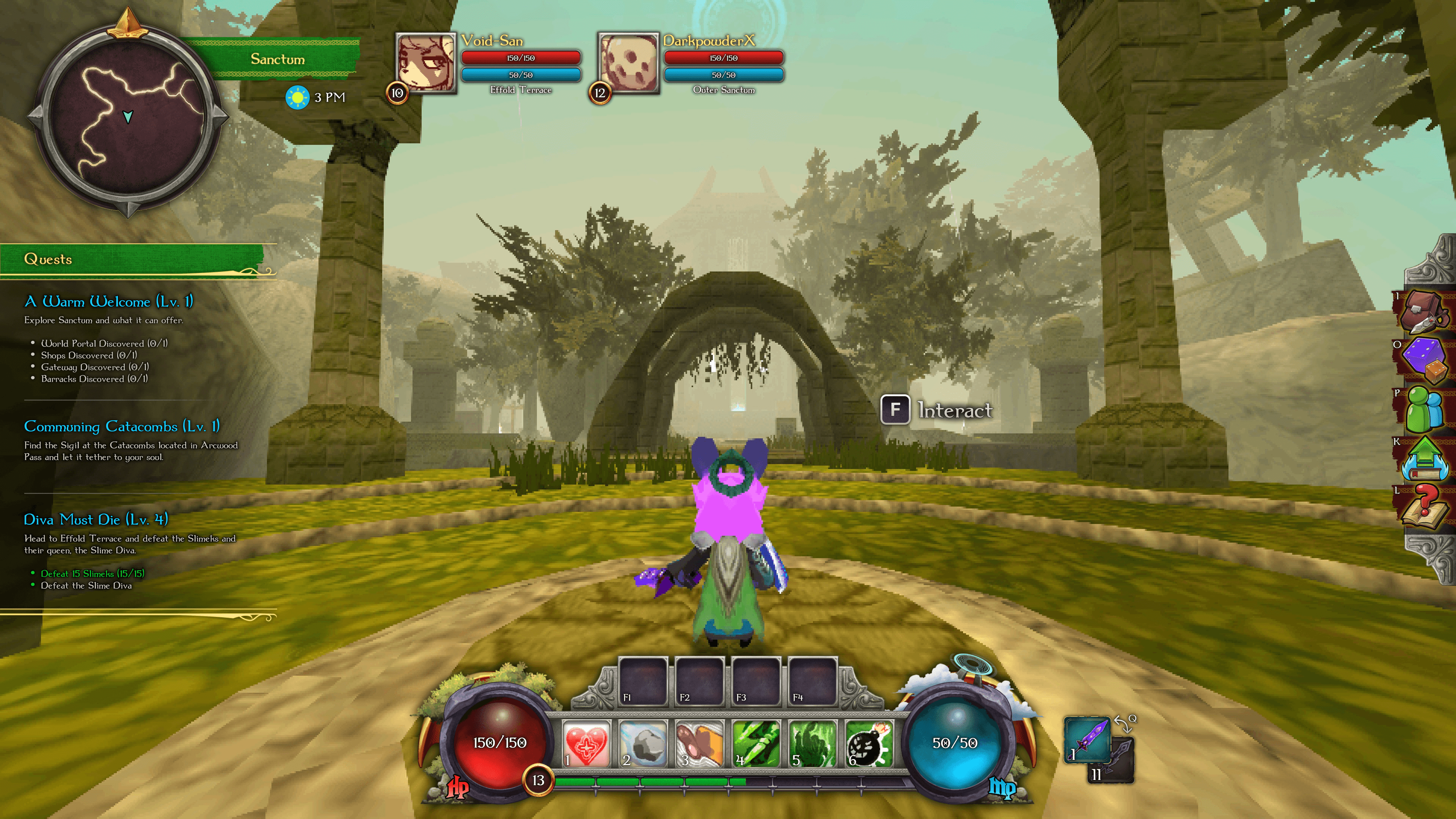
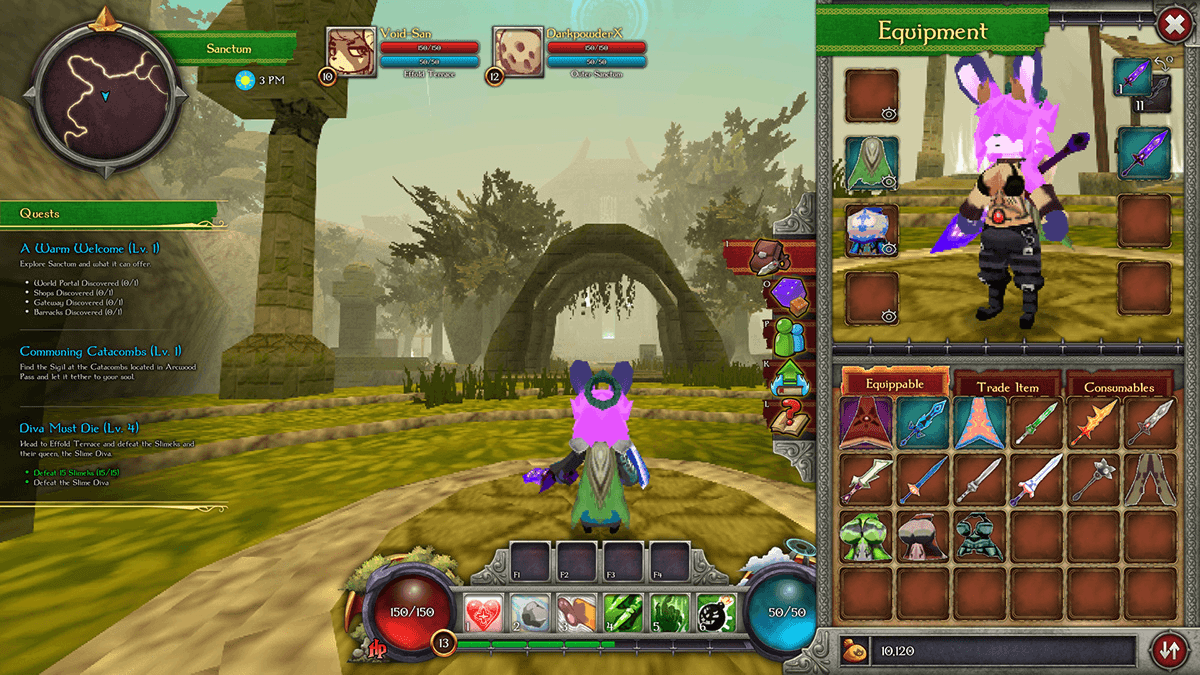
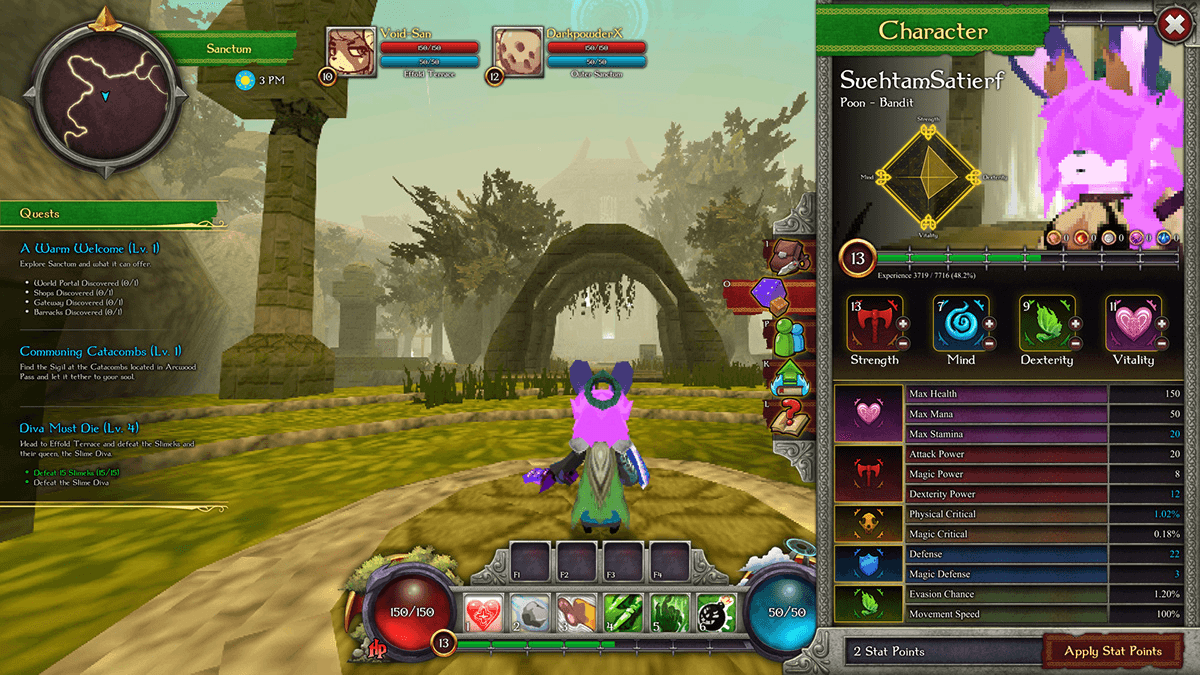
DESIGN EVALUATION
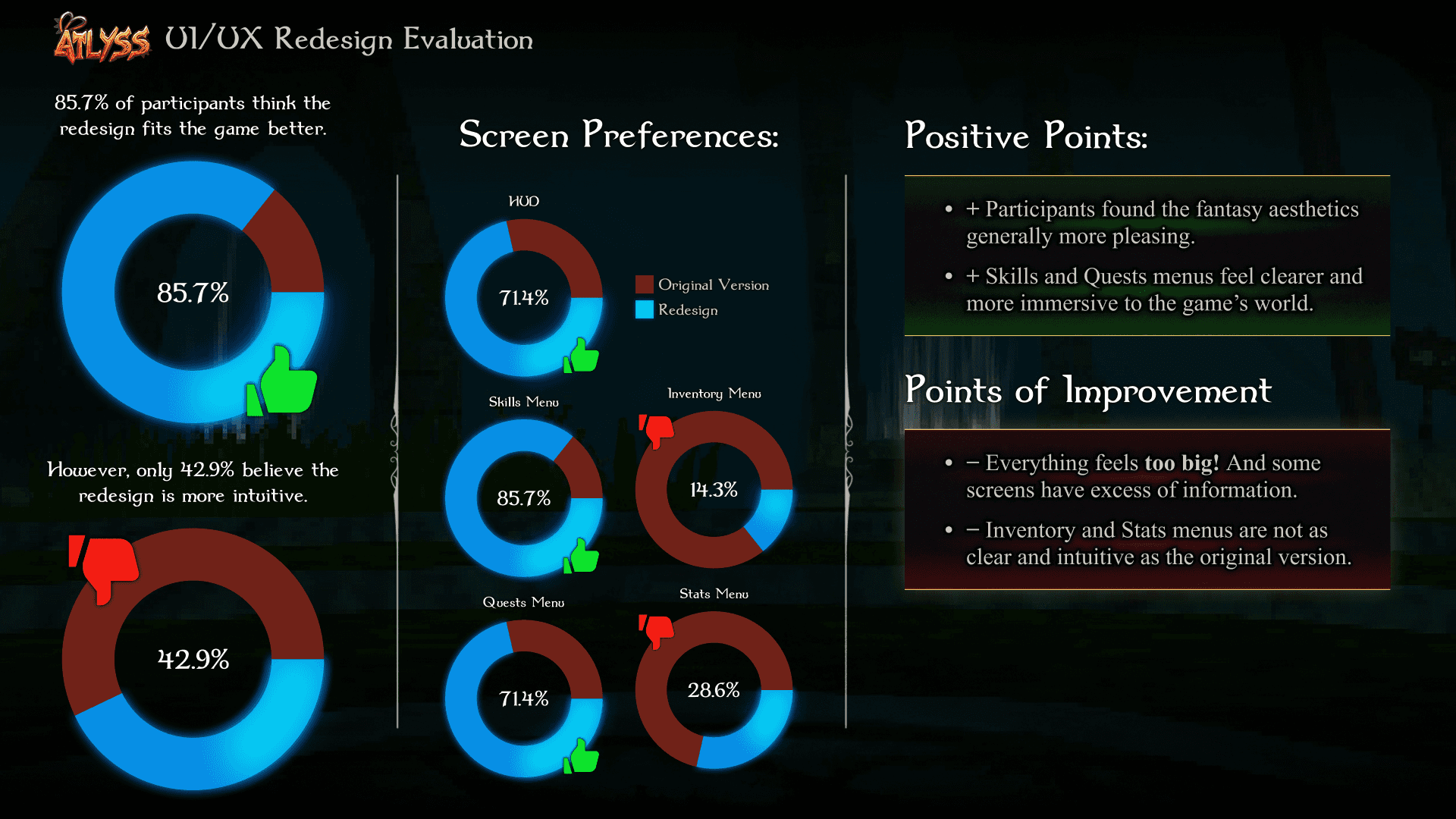
I conducted an A/B test with 28 participants comparing the original UI to my first high-fidelity pass.
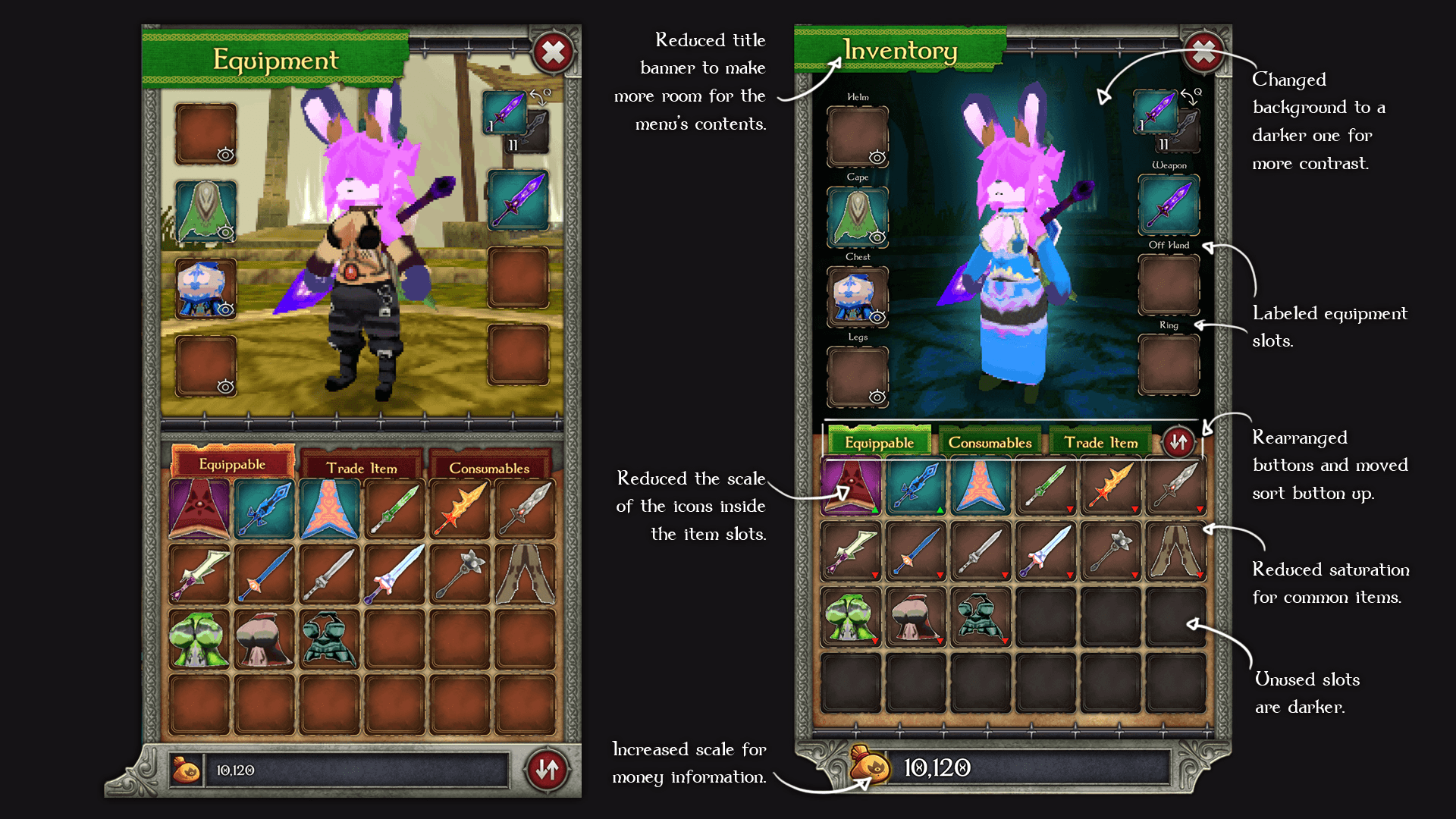
The Feedback: While 85% preferred the new aesthetic, only 15% found the initial Inventory redesign intuitive. Users felt the full-screen sidebars were "claustrophobic" for a third-person game.
The Pivot: Scaled down all components and transitioned from rigid sidebars to floating windows. This restored peripheral vision and reduced visual tension.
FINAL RESULT
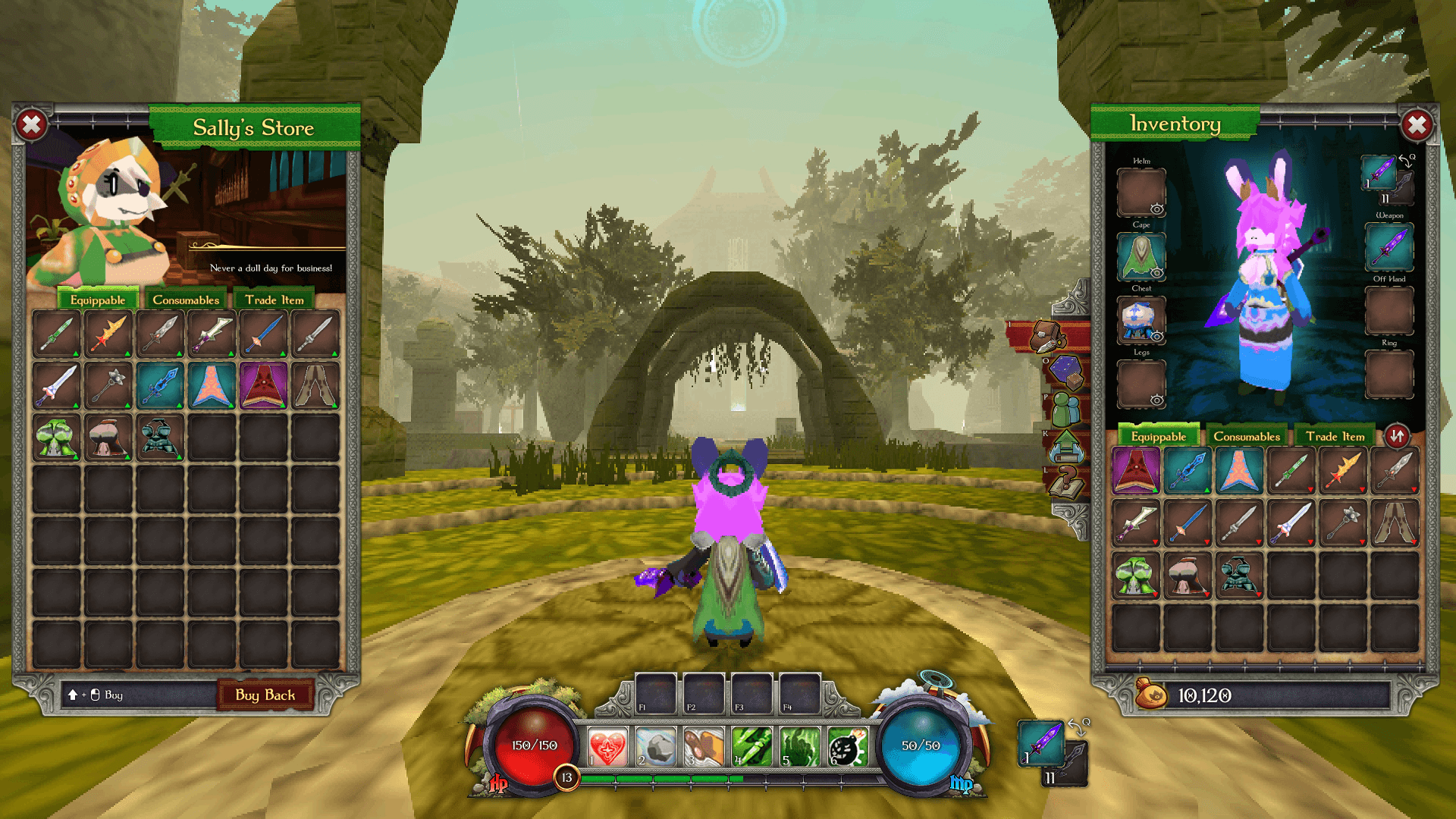
HUD Optimization: Toned down opacity on peripheral elements to increase immersion.
Clarity: Brightened health/mana bars for "at-a-glance" readability during high-intensity combat.
Interactivity: Implemented a retractable Quest Log to give players control over screen real estate.
Original
Redesign
Original
Redesign
Original
Redesign
Original
Redesign
Original
Redesign
KEY TAKEAWAY
"This project reinforced the importance of balancing aesthetic 'flair' with functional minimalism; a beautiful UI is only successful if it stays out of the player's way during gameplay."
TYPE OF PROJECT:
UX/UI Redesign of the game "ATLYSS"
PROJECT LENGTH:
2 MONTHS
ROLE:
UI ARTIST &
UX DESIGNER
TOOLS UTILIZED:
INTRODUCTION
A 2-month solo project focused on modernizing the HUD and Menu systems of the indie ARPG Atlyss. The goal was to replace an unintuitive, inconsistent interface with a hand-painted, Celtic-inspired UI that improves combat readability and visual cohesion.
THE PROBLEM
Visual Inconsistency: Clashing typefaces and buttons that lacked affordance.
Poor Ergonomics: Critical combat information (Quick Slots) was pushed to the screen edges, far from the player’s focal point.
UI Clutter: Unnecessary persistent info (inventory counts) obstructed the third-person view.
VISUAL DIRECTION
I established a Hand-Painted / Celtic Aesthetic to match the game’s high-fantasy theme.
The HUD: Redesigned the central bar to integrate Quick Slots and Health/Mana into a single, cohesive unit.
Natural Mapping: Relocated the Level indicator next to the XP bar to create a logical connection between progression and status.
LOW-FIDELITY WIREFRAME
With the information architecture figured out, I was ready to move on to some sketching. I started by wireframing on paper, exploring different layout ideas for the game's HUD and in-game menus. I then moved on to Figma to create a low-fidelity wireframe based on the sketches I had done. Since a good chunk of the exploration had been done on paper, it was mostly a matter of translating it into a digital format.
CONCEPT ART
I redesigned the central HUD to improve combat readability by centralizing critical information. Key modifications include:
Ergonomic Integration: I moved the quick-slots from the screen periphery to the central bar, allowing players to track consumables without losing focus on the action.
Natural Mapping: The player level was relocated directly adjacent to the experience bar, creating a logical visual connection for character progression.
Material Rendering: Using the concept sketches as a structural guide, I rendered the final assets with a focus on tactile skeuomorphism to enhance immersion.
Many of the icons used in this project were taken directly from the game's wiki page, but some new ones had to be created, and others were redone from scratch due to low resolution.
HIGH-FIDELITY WIREFRAME - FIRST VERSION
At this point, I had all I needed to create a first pass of the high-fidelity wireframe. At this point in the process, most skeuomorphic assets were already done, meaning that building and experimenting with designs in Figma was faster than in Photoshop. This first version was essential to collect feedback from users.
DESIGN EVALUATION
I conducted an A/B test with 28 participants comparing the original UI to my first high-fidelity pass.
The Feedback: While 85% preferred the new aesthetic, only 15% found the initial Inventory redesign intuitive. Users felt the full-screen sidebars were "claustrophobic" for a third-person game.
The Pivot: Scaled down all components and transitioned from rigid sidebars to floating windows. This restored peripheral vision and reduced visual tension.
FINAL RESULT
HUD Optimization: Toned down opacity on peripheral elements to increase immersion.
Clarity: Brightened health/mana bars for "at-a-glance" readability during high-intensity combat.
Interactivity: Implemented a retractable Quest Log to give players control over screen real estate.
Original
Redesign
Original
Redesign
Original
Redesign
Original
Redesign
Original
Redesign
KEY TAKEAWAY
"This project reinforced the importance of balancing aesthetic 'flair' with functional minimalism; a beautiful UI is only successful if it stays out of the player's way during gameplay."
TYPE OF PROJECT:
UX/UI Redesign of the game "ATLYSS"
PROJECT LENGTH:
2 MONTHS
ROLE:
UI ARTIST &
UX DESIGNER
TOOLS UTILIZED:
INTRODUCTION
A 2-month solo project focused on modernizing the HUD and Menu systems of the indie ARPG Atlyss. The goal was to replace an unintuitive, inconsistent interface with a hand-painted, Celtic-inspired UI that improves combat readability and visual cohesion.
THE PROBLEM
Visual Inconsistency: Clashing typefaces and buttons that lacked affordance.
Poor Ergonomics: Critical combat information (Quick Slots) was pushed to the screen edges, far from the player’s focal point.
UI Clutter: Unnecessary persistent info (inventory counts) obstructed the third-person view.
VISUAL DIRECTION
I established a Hand-Painted / Celtic Aesthetic to match the game’s high-fantasy theme.
The HUD: Redesigned the central bar to integrate Quick Slots and Health/Mana into a single, cohesive unit.
Natural Mapping: Relocated the Level indicator next to the XP bar to create a logical connection between progression and status.
LOW-FIDELITY WIREFRAME
With the information architecture figured out, I was ready to move on to some sketching. I started by wireframing on paper, exploring different layout ideas for the game's HUD and in-game menus. I then moved on to Figma to create a low-fidelity wireframe based on the sketches I had done. Since a good chunk of the exploration had been done on paper, it was mostly a matter of translating it into a digital format.
CONCEPT ART
I redesigned the central HUD to improve combat readability by centralizing critical information. Key modifications include:
Ergonomic Integration: I moved the quick-slots from the screen periphery to the central bar, allowing players to track consumables without losing focus on the action.
Natural Mapping: The player level was relocated directly adjacent to the experience bar, creating a logical visual connection for character progression.
Material Rendering: Using the concept sketches as a structural guide, I rendered the final assets with a focus on tactile skeuomorphism to enhance immersion.
Many of the icons used in this project were taken directly from the game's wiki page, but some new ones had to be created, and others were redone from scratch due to low resolution.
HIGH-FIDELITY WIREFRAME - FIRST VERSION
At this point, I had all I needed to create a first pass of the high-fidelity wireframe. At this point in the process, most skeuomorphic assets were already done, meaning that building and experimenting with designs in Figma was faster than in Photoshop. This first version was essential to collect feedback from users.
DESIGN EVALUATION
I conducted an A/B test with 28 participants comparing the original UI to my first high-fidelity pass.
The Feedback: While 85% preferred the new aesthetic, only 15% found the initial Inventory redesign intuitive. Users felt the full-screen sidebars were "claustrophobic" for a third-person game.
The Pivot: Scaled down all components and transitioned from rigid sidebars to floating windows. This restored peripheral vision and reduced visual tension.
FINAL RESULT
HUD Optimization: Toned down opacity on peripheral elements to increase immersion.
Clarity: Brightened health/mana bars for "at-a-glance" readability during high-intensity combat.
Interactivity: Implemented a retractable Quest Log to give players control over screen real estate.
Original
Redesign
Original
Redesign
Original
Redesign
Original
Redesign
Original
Redesign
KEY TAKEAWAY
"This project reinforced the importance of balancing aesthetic 'flair' with functional minimalism; a beautiful UI is only successful if it stays out of the player's way during gameplay."


